

For browser-based scraping and standard HTTP automation, use an HTTP(S) proxy. For mixed-protocol traffic, proxy-side DNS resolution, or UDP/QUIC workloads, use SOCKS5. That split holds because HTTP proxies understand HTTP semantics well enough to inspect and route requests, while SOCKS5 works as a lower-level relay that forwards bytes without caring what's inside them.
The practical evidence for this comes down to three things: where DNS resolves, whether your traffic is plain TCP or needs UDP, and what your client libraries actually support out of the box. Before you commit either way:
- Test the CONNECT method against your target endpoints.
- Confirm whether your library defaults to
socks5(client-side DNS) orsocks5h(proxy-side DNS). - Check that your provider actually supports the protocol features you're assuming, especially UDP.
Key Takeaways
The right proxy protocol depends on whether your traffic needs proxy-side DNS or UDP support, not on which protocol sounds more advanced.
| Point | Details |
|---|---|
| Default to HTTP for web work | Browsers, HTTP SDKs, and scraping frameworks expect HTTP proxies with minimal configuration. |
| Reserve SOCKS5 for UDP or DNS needs | Use SOCKS5 only when you need proxy-side DNS resolution or UDP/QUIC relay support. |
| Test before you architect | Run CONNECT and socks5h tests against your actual library before locking in a protocol. |
| Performance is provider-dependent | Throughput differences come from gateway hardware and concurrency limits, not the protocol spec. |
| Hybrid setups are common in production | Split workloads: HTTP for bulk scraping, SOCKS5 for specialized non-HTTP tasks. |
Socks5 vs HTTP Proxy at a Glance
The table below breaks down the technical axes that matter most when picking between the two protocols for automated workflows.
| Capability | HTTP Proxy | SOCKS5 Proxy |
|---|---|---|
| Parses HTTP / header manipulation | Yes, for plaintext requests | No, treats traffic as opaque bytes |
| HTTPS handling (CONNECT tunnel) | Establishes tunnel, can't read inside it | Tunnels any TCP traffic, including TLS |
| Proxy-side DNS | Rare, depends on implementation | Yes, via socks5h or equivalent |
| UDP support | No | Optional, via UDP ASSOCIATE |
| Typical client compatibility | Native in browsers, curl, most SDKs | Requires adapters in many HTTP-only libraries |
| Authentication methods | Basic auth via Proxy-Authorization header | Username/password negotiation, no-auth |
Throughput differences between the two protocols are almost always a provider or network story, not a protocol one. A SOCKS5 gateway on congested hardware will lose to a well-provisioned HTTP proxy every time, and vice versa. Don't assume UDP support just because a provider lists SOCKS5 on a feature sheet. Confirm it with a direct test, since plenty of gateways advertise the protocol but disable UDP relay by default.
What an HTTP proxy and a SOCKS5 proxy actually are
An HTTP proxy operates at the application layer. It reads your request, understands methods like GET and POST, and can forward plaintext HTTP or open a CONNECT tunnel for HTTPS traffic. That awareness is exactly why it fits so well into browser stacks: it speaks the same language as the client.
A SOCKS5 proxy doesn't. It works one layer down, relaying TCP connections (and optionally UDP datagrams) without interpreting the application protocol riding on top. It doesn't know or care if the payload is HTTP, an SMTP handshake, or a game server's UDP packets. That indifference is a feature, not a limitation, once you need protocol flexibility.
A quick note on lineage, since the SOCKS family isn't monolithic:
- SOCKS4 supports only TCP and requires the client to resolve DNS itself.
- SOCKS4a extends SOCKS4 to allow proxy-side hostname resolution when the client can't resolve a domain locally.
- SOCKS5 adds UDP support, stronger authentication negotiation (including username/password), and full proxy-side DNS resolution.
Almost every modern deployment should target SOCKS5 specifically. The older revisions exist mostly in legacy tooling and rarely offer any advantage worth chasing.
How the protocols actually differ under the hood
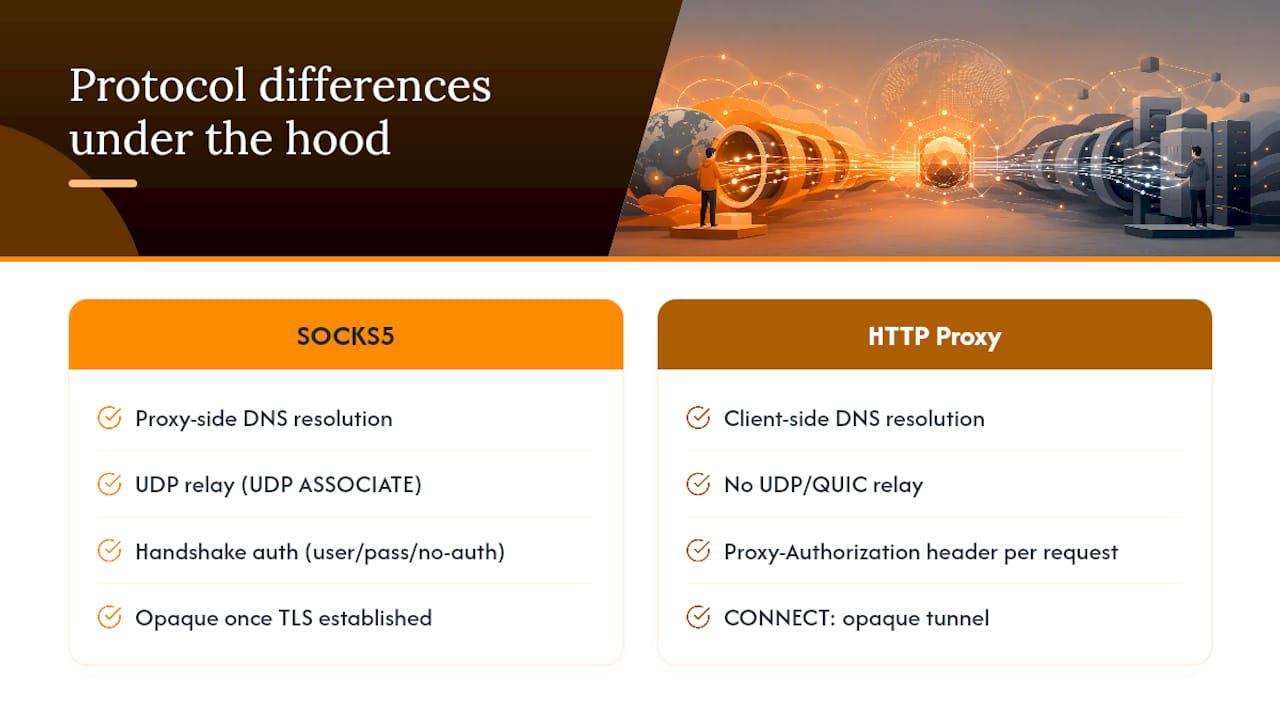
The gap between these two protocols isn't cosmetic. It changes where DNS resolves, what you can inspect, and what kinds of traffic you can even carry.
DNS resolution location matters more than most engineers assume. With a standard HTTP proxy, your client usually resolves DNS locally before the request ever reaches the proxy. With SOCKS5 configured correctly (using socks5h rather than plain socks5), the proxy resolves DNS on its end. That difference decides whether geo-targeted DNS answers reflect your machine's location or the proxy's, and whether a domain blocked at your local resolver still reaches its target through the gateway.
TLS and CONNECT semantics define the ceiling on what an HTTP proxy can do with encrypted traffic. Once a client issues a CONNECT request, the proxy just tunnels encrypted bytes between client and server. It cannot read or rewrite headers inside that tunnel, no matter how sophisticated its plaintext parsing is elsewhere. Header injection only works on plaintext HTTP.
UDP and QUIC are where SOCKS5 pulls ahead structurally. The protocol can relay UDP datagrams through a UDP ASSOCIATE command, which matters increasingly as more services move to QUIC (HTTP/3's transport). Plenty of providers, though, sell SOCKS5 access without enabling UDP relay, so this is a feature to verify rather than assume.
Authentication flows differently too. HTTP proxies typically use a Proxy-Authorization header carrying Basic or Digest credentials, sent with every request. SOCKS5 negotiates authentication during the initial handshake, supporting username/password or no-auth modes before any data moves.
Pro Tip: If a scraping job suddenly starts failing DNS lookups for geo-restricted content, check whether your client fell back to local DNS resolution. Switching to
socks5hfixes this more often than any other single setting.
Why "faster" is the wrong question to ask
Claims that one protocol outperforms the other rarely survive scrutiny. What actually drives throughput is gateway hardware, concurrency limits, and network routing, not the protocol spec itself. A poorly provisioned proxy pool of either type chokes under load; a well-run one doesn't.
There's a narrow case where SOCKS5 saves CPU cycles: because it doesn't parse HTTP, it streams bytes with less processing overhead than an HTTP proxy that inspects headers on every request. In practice, this saving is marginal unless you're running extreme request volumes where every microsecond of parsing adds up.
Security-wise, neither protocol can inspect traffic inside a TLS/CONNECT tunnel. That's a data point worth internalizing, because purpose-built MITM inspection tools are a separate product category entirely, not a variant of standard proxying. If you need real benchmarks, measure latency under concurrent load, TLS handshake time, and throughput per thread. Skip synthetic single-request tests; they don't reflect production conditions.
Matching the protocol to the job
- Browser automation and web scraping. Use an HTTP(S) proxy. Browsers, headless automation tools, and most HTTP SDKs expect this protocol natively, and it drops into existing tooling with minimal friction.
- API calls needing header manipulation. If the API runs over plaintext HTTP, an HTTP proxy lets you modify headers in transit. Once the API moves to HTTPS, that door closes for both protocols since CONNECT tunnels are opaque.
- Mixed-protocol or UDP/QUIC workloads. Choose SOCKS5, and confirm the provider actually supports UDP ASSOCIATE before you build around it.
- DNS-sensitive geo-testing. SOCKS5 with
socks5hforces resolution at the proxy, which matters for testing region-specific DNS answers.
Most production scraping setups don't need to pick one protocol exclusively. A hybrid approach works better in practice: run the bulk of web scraping traffic over HTTP proxies for compatibility, then route any non-HTTP or UDP-dependent tasks through SOCKS5 endpoints.
Pro Tip: Don't default to SOCKS5 just because it sounds more capable. Community threads on Stack Overflow are full of engineers who added SOCKS5 complexity to a job that only needed HTTP, then spent hours debugging library compatibility instead of shipping.
Wiring proxies into your actual toolchain
Environment variables are the first place integration breaks. Most tools honor HTTP_PROXY and HTTPS_PROXY, but some only check ALL_PROXY, and mixing these across tools in the same pipeline leads to silent fallbacks that are hard to diagnose.
- Test HTTP proxy connectivity with
curl --proxy http://user:pass@host:port https://example.com. - Test SOCKS5 with proxy-side DNS using
curl --socks5-hostname user:pass@host:port https://example.com. - Verify TLS tunneling manually with
openssl s_client -connect host:443 -proxy proxyhost:proxyport. - Browsers need SOCKS5 configured at the OS or extension level; native HTTP proxy support is built in.
- Python's
requestsneedsrequests[socks]installed for SOCKS5; Node'shttp/httpsmodules need an agent likesocks-proxy-agent.
A troubleshooting checklist before you file a support ticket
- Confirm the proxy type and port match what your client is configured for.
- Verify authentication succeeds independently of the actual request (a bare CONNECT or handshake test).
- Check DNS resolution mode. Use
socks5hif you need proxy-side lookups. - Test CONNECT tunneling specifically for any HTTPS target that's failing.
- Drop concurrency and retry. Many "protocol" failures are actually rate limits or connection pool exhaustion.
- Try an alternate gateway or region to rule out a localized outage.
Common mistakes worth ruling out early: expecting UDP on a plan that doesn't include it, setting HTTP_PROXY in one tool while another only reads ALL_PROXY, and expecting header rewrites on HTTPS traffic that's tunneled through CONNECT. When you do contact support, hand over the exact curl or openssl command you ran, the response code or error text, and your concurrency setting at the time of failure.
Pro Tip: Choosing SOCKS5 for a job that's really just HTTP scraping often adds more debugging overhead than it saves in flexibility. Test both protocols against your actual library before locking in an architecture.
Where Rotatingproxyhub fits into this decision
Rotatingproxyhub runs both protocols on the same rotating datacenter infrastructure, so you're not choosing a vendor based on which protocol they happen to support. The platform gives access to over 50,000 proxies across global locations with HTTP/S and SOCKS5 endpoints, country targeting, and configurable rotation built for high-concurrency automation.
That matters practically: you can run your browser scraping fleet over HTTP proxies and shift a UDP-dependent monitoring job to SOCKS5 without switching providers or re-authenticating against a different system. Engineers building web scraping pipelines or exploring broader rotating proxy use cases can test both protocols against real target sites before committing to an architecture.
What actually determines your choice
Most guides frame this as a protocol war, and that framing is wrong. The real decision tree is narrower than people assume: does your traffic need UDP, does it need proxy-side DNS, and does your client library already expect one protocol over the other? Answer those three questions honestly and the choice usually makes itself.
Where conventional advice falls short is treating SOCKS5 as the "advanced" or "more secure" option by default. It isn't more secure. It's less aware of your traffic, which is a different property entirely, and that opacity is a liability when you actually need to manipulate plaintext headers. The engineers who waste the most time are the ones who pick SOCKS5 for prestige rather than for a UDP or DNS requirement they can name.
Prioritize testing over assumption. Run the CONNECT test, run the socks5h test, and let your actual library's behavior decide the architecture, not a spec sheet.
Frequently Asked Questions
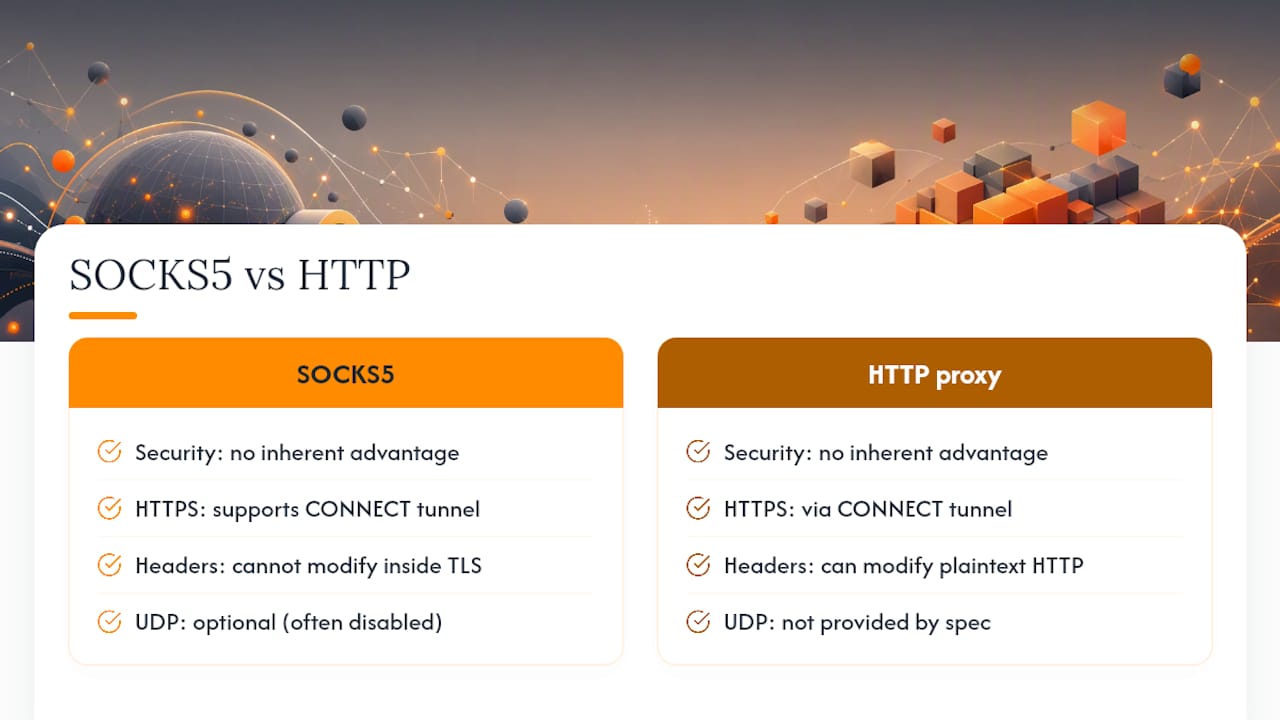
Is SOCKS5 more secure than an HTTP proxy? Not inherently. Neither protocol can inspect traffic inside a TLS/CONNECT tunnel, so encrypted HTTPS traffic gets the same protection either way. SOCKS5's opacity to application data is a routing property, not a security upgrade.
Can an HTTP proxy handle HTTPS traffic? Yes, through a CONNECT tunnel, but it can't read or modify anything inside that encrypted tunnel. It can only manipulate headers on plaintext HTTP requests.
Does SOCKS5 always support UDP? No. UDP relay through UDP ASSOCIATE is optional in the SOCKS5 spec, and many providers restrict or disable it even when they advertise SOCKS5 support. Always confirm directly with the provider.
Why do my scraping requests fail after switching to SOCKS5?
The most common cause is a library defaulting to client-side DNS resolution (socks5) instead of proxy-side resolution (socks5h), which breaks geo-targeted requests or triggers blocks tied to your local IP's DNS footprint.
Should I use HTTP or SOCKS5 for API automation? If the API runs over plaintext HTTP and you need to manipulate headers, use an HTTP proxy. For HTTPS APIs, header manipulation isn't possible through either protocol, so the choice comes down to whether you need UDP or proxy-side DNS elsewhere in your pipeline.