

The fastest way to add reliable scrapy proxy rotation is to enable a rotating-proxy downloader middleware, or point Scrapy at a rotating gateway, then configure ban detection and retry limits in settings.py. That combination handles the two problems that break most scraping projects: getting a fresh IP per request and knowing when an exit has been burned.
You have two practical routes:
- Drop-in middleware with a proxy list. Install a rotating middleware, feed it a pool of proxy URLs, and let it cycle through them automatically.
- Rotating gateway. Point one URL at a provider's gateway and let it hand you a new exit IP per connection, with no list to maintain.
Three settings matter immediately: the middleware order in DOWNLOADER_MIDDLEWARES, whether you're using ROTATING_PROXY_LIST or ROTATING_PROXY_GATEWAY, and ROTATING_PROXY_MAX_RETRIES.
Pro Tip: Reach for a rotating gateway on high-ban targets. Datacenter IPs get ASN-scored fast on sites running Cloudflare or DataDome, and residential exits usually survive longer.
Key Takeaways
Reliable Scrapy proxy rotation depends on disabling the default proxy middleware, choosing a gateway or list model that matches your scale, and tuning ban detection before tuning retries.
| Point | Details |
|---|---|
| Disable the default middleware | Turn off HttpProxyMiddleware before enabling a rotating proxy middleware, or bans go undetected. |
| Choose gateway vs. list deliberately | Use a rotating gateway for high-scale, high-ban targets; use a static list for session stickiness. |
| Tune ban detection first | Set ROTATING_PROXY_BAN_CODES and body-signature checks before adjusting retry limits. |
| Fix exit quality, not just retries | ASN-scored IPs need a cleaner pool, not a higher ROTATING_PROXY_MAX_RETRIES. |
| Rotatingproxyhub for managed rotation | Offers a rotating datacenter gateway with over 50,000 proxies, HTTP/S and SOCKS5 support, and unlimited bandwidth for Scrapy projects. |
What You Need Before Setting Up Scrapy Ip Rotation
A working Scrapy project is the baseline. Run scrapy version to confirm your install, and make sure you have a spider that already crawls successfully without a proxy.
Beyond that, you need:
- Python with
pipaccess and permission to editsettings.pyand add custom downloader middleware. - A proxy source: either a static list of proxy URLs (HTTP/S or SOCKS5) or a rotating gateway endpoint with credentials.
- Log access, so you can watch retry and ban behavior once rotation is live.
- Environment variables for proxy credentials rather than hardcoded passwords in your spider code, which keeps secrets out of version control.
Quick Setup: Enabling Rotating Proxies In Scrapy
The scrapy-rotating-proxies middleware from TeamHG-Memex is the standard drop-in for this job. It rotates proxies per request, tracks which ones are dead or alive, and retries automatically on common blocks like 403 and 429 responses.
Start with pip install scrapy-rotating-proxies, then update settings.py:
DOWNLOADER_MIDDLEWARES = {
    'scrapy.downloadermiddlewares.httpproxy.HttpProxyMiddleware': None,
    'rotating_proxies.middlewares.RotatingProxyMiddleware': 610,
    'rotating_proxies.middlewares.BanDetectionMiddleware': 620,
}

ROTATING_PROXY_LIST = [
    'http://user:pass@host1:port',
    'http://user:pass@host2:port',
    'socks5://USER:PASS@host3:port',
]
Disabling Scrapy's built-in HttpProxyMiddleware matters here. That default middleware assigns one proxy and never reacts when it gets blocked, which defeats the point of rotation, according to the middleware's own documentation.
If you're using a managed gateway instead of a list, swap ROTATING_PROXY_LIST for a single value:
ROTATING_PROXY_GATEWAY = 'http://user:[email protected]:port'
Two more settings control resilience:
ROTATING_PROXY_MAX_RETRIES(defaults to 5) caps how many times a banned request gets rescheduled with a new exit.ROTATING_PROXY_BAN_CODESlets you define which status codes count as a ban, beyond the defaults.
One behavioral detail catches people off guard: if your spider sets request.meta['proxy'] explicitly, the middleware leaves that request alone. That's useful when you need a specific exit for one call and rotation for everything else.
Pro Tip: Test the middleware against a known "safe" endpoint like httpbin.org before pointing it at a real target. It confirms your credentials and list format work before you burn proxy budget on a hostile site.
Rotating Gateway Or Static Proxy List: Which Fits Your Project?
A rotating gateway is a single endpoint that hands out a new exit IP on every connection. You configure it once and never touch a proxy list again.
A static list is a developer-managed pool of proxy URLs you supply directly to the middleware. It gives you control over which regions or exits you use, and it supports sticky sessions when a target site requires session continuity across several requests.
The tradeoffs come down to three things:
- Reliability against ASN scoring. A gateway backed by residential exits usually beats a static datacenter list on sites that fingerprint IP reputation aggressively.
- Management overhead. Lists need refreshing as proxies die; gateways handle that centrally.
- Session stickiness. Static lists make it easier to pin a session to one IP when a target requires login persistence or cart continuity.
Pick a gateway for high-scale crawls where fresh rotation matters more than exit control. Pick a static list when you need session affinity or specific regional IPs for geo-targeted scraping.
Pro Tip: If your target requires login sessions, look for a gateway that supports optional sticky-session parameters instead of falling back to a fully static list.
How Does Scrapy Detect And Retry Banned Requests?
Ban detection in scrapy-rotating-proxies runs on two signals: HTTP status codes and response-body patterns.
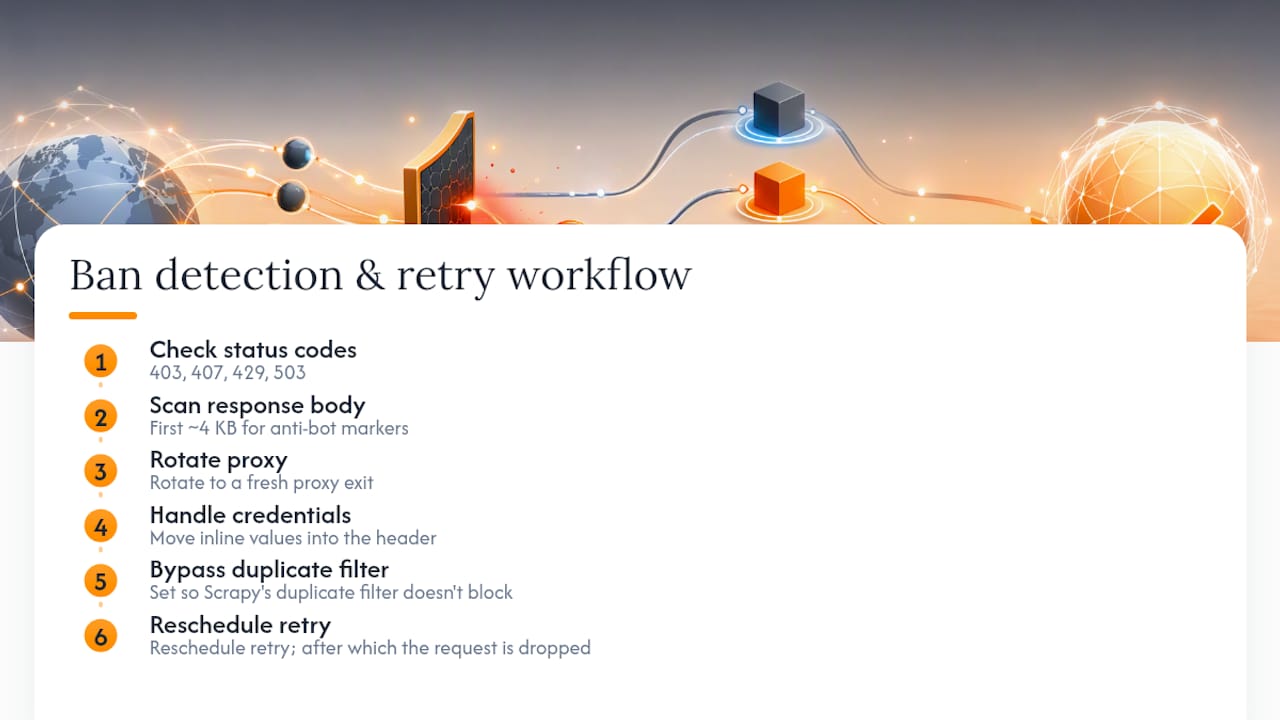
Status codes in ROTATING_PROXY_BAN_CODES commonly include 403, 407, 429, and 503. Beyond codes, the middleware also scans the first roughly 4 KB of the response body for known anti-bot markers, including Cloudflare's "Just a moment" challenge page, the cf-chl string, and signatures associated with DataDome and PerimeterX.
When a ban is detected, the middleware doesn't just fail the request. It rotates to a fresh proxy, sets dont_filter=True so Scrapy's duplicate filter doesn't block the retry, and reschedules the request. That cycle continues up to ROTATING_PROXY_MAX_RETRIES, after which the request is dropped.
Credential handling is automatic too: inline user:pass values in your proxy URLs get moved into the Proxy-Authorization header rather than sent as part of the connection string, according to the middleware's implementation.
Tuning ROTATING_PROXY_MAX_RETRIES is a balance. Raise it when your proxy source delivers consistently clean exits and a few retries usually get through. Lower it to fail fast when the exit pool is weak. Chasing a bad pool with a high retry count just burns time and bandwidth on requests that were never going to succeed.
Pro Tip: Log every ban detection and retry with a per-proxy health counter. That distinguishes a transient block from a proxy whose ASN is permanently scored, which tells you whether to wait it out or drop the exit entirely.
Why Is My Spider Still Getting Blocked After Rotation?
Rotation alone doesn't guarantee success. Work through these checks in order when a spider stays blocked.
- ASN-level scoring. If every exit in a datacenter range gets flagged regardless of rotation, the fix is switching to residential exits or a different provider, not rotating faster within the same scored range.
- TLS or browser fingerprint mismatch. Rotating IPs does nothing if your TLS handshake or request headers still look automated. A JA3 fingerprint or a missing
Accept-Languageheader can flag a request before the IP is even checked. - Credential or header issues. Confirm
Proxy-Authorizationis being set correctly, particularly if you're buildingbasic_auth_headervalues from environment variables. - Accidental per-request overrides. Check your spider code for
request.meta['proxy']being set globally, which silently bypasses the rotating middleware for every request. - Retry loops. Inspect logs for requests that keep rescheduling without progress. If retries never resolve, you've likely hit a hard block that rotation can't fix.
A fast diagnostic: replicate the blocked request manually through the same proxy using curl, and compare the response body to what your spider logs. That tells you exactly what anti-bot signature you're facing.
Pro Tip: Open the blocked URL in a real browser through the same proxy. If the browser also gets challenged, the problem is the exit IP or fingerprint, not your Scrapy code.
Building Your Own Rotation Middleware: Patterns and Pitfalls
Some teams need custom logic that the standard middleware doesn't cover, like provider-specific headers or custom health scoring.
The minimal pattern sets request.meta['proxy'], attaches a Proxy-Authorization header using w3lib.http.basic_auth_header, and checks whether the request already has a proxy set before overriding it, following the pattern shown in community middleware examples.
Keep ban detection cheap: check status codes and the first chunk of the response body, not the full page, or you'll slow down high-throughput crawls.
Track per-proxy health with a failure counter, and drop proxies once they cross a threshold. If you manage a static list, persist that health data across runs so a dead proxy doesn't reappear on the next crawl.
Respect Scrapy's retry mechanics: reschedule with dont_filter=True and a decremented retry count, or duplicate filtering will silently swallow your retries.
One common mistake: mixing synchronous proxy health checks into an async downloader pipeline. Blocking I/O inside middleware stalls the whole crawl, not just one request.
Pro Tip: Before building this from scratch, check whether the existing scrapy-rotating-proxies ban logic covers your case. Reusing tested signatures beats re-discovering them under production traffic.
Managing and Refreshing Your Proxy List
A proxy list is a living resource, not a one-time configuration. Proxies die, get blacklisted, or degrade in speed, and a list that isn't maintained quietly turns into dead weight your middleware keeps retrying against.
Set a refresh cadence based on how aggressively your targets fingerprint traffic. Sites with strong anti-bot protection can burn through a static list within hours; lighter targets might tolerate the same list for days.
A few practices keep a static list healthy:
- Track per-proxy success rates, not just uptime. A proxy that responds but returns challenge pages is functionally dead for scraping purposes.
- Remove proxies below a failure threshold automatically rather than manually pruning logs after the fact.
- Segment lists by target or region when different spiders need different geographic exits, instead of running one undifferentiated pool.
- Automate refresh via your provider's API where available, pulling a fresh batch on a schedule instead of hand-editing
ROTATING_PROXY_LIST.
Teams running large static lists often find the maintenance overhead exceeds the cost savings versus a managed gateway, particularly once you account for engineering time spent monitoring proxy health. That's the practical argument for a gateway model on any project running beyond a handful of spiders.
Performance Impact of Scrapy Proxy Rotation
Rotation adds latency. Every proxy hop introduces connection overhead, and a middleware checking ban signatures on each response adds a small processing cost per request. Neither is usually significant on its own, but at scale they compound.
The bigger performance risk is concurrency mismatch. Scrapy's CONCURRENT_REQUESTS setting controls how many requests run in parallel, and if that number outpaces what your proxy pool or gateway can sustain, you'll see rising retry rates rather than raw slowdowns. A gateway with a hard concurrent-connection cap will start queuing or rejecting requests once you exceed it, which shows up in your logs as unexplained 429s.
Monitor three signals to catch rotation-related performance issues early:
- Request success rate over time, tracked per proxy or per gateway if you can, to spot degradation before it tanks your crawl.
- Retry-to-success ratio. A rising ratio means your exits are burning out faster than they're replaced.
- Average response time per request. A sudden increase often means you've hit a rate limit or a slower exit pool, not a code regression.
Scrapy's built-in stats collector reports retry counts and response codes by default, and pairing that with your own per-proxy logging gives a clear picture of whether rotation is helping or just adding overhead without improving success rates.
Connecting Scrapy To Proxy Providers and Rotation APIs
Most managed proxy services expose either a static gateway endpoint or an API for provisioning proxy credentials dynamically. The gateway model is simpler for Scrapy: one URL, one set of credentials, no ongoing list management on your end.
For projects that need dynamic sourcing, some providers expose an API to pull fresh proxy endpoints, check pool status, or rotate credentials programmatically. Integrating that with Scrapy usually means writing a small helper that queries the provider's API on spider startup, populates ROTATING_PROXY_LIST, and refreshes it on a schedule using Scrapy's spider_idle signal or a periodic task outside the crawl itself.
Keep the integration boundary clean: fetch and validate proxies outside the request cycle, then hand a ready list or gateway URL to the middleware. Trying to call a provider's API inline during request processing adds latency exactly where you can't afford it.
Whichever approach you choose, test provider integration against a low-stakes target first. Confirming that credentials, rotation frequency, and concurrency limits behave as documented before pointing the setup at a production target saves debugging time later.
Security Considerations When Using Third-Party Proxies
Routing traffic through a third-party proxy means that provider can see your requests, including any headers, cookies, or query parameters you send. Never send credentials for your own systems, or sensitive query data, through a proxy pool you don't fully trust.
A few security habits matter specifically for Scrapy setups:
- Keep proxy credentials in environment variables, not in
settings.pyor committed code, so a leaked repository doesn't leak your proxy account too. - Use HTTPS targets when possible. An HTTP-only proxy hop between you and an HTTP target exposes response content to that hop; HTTPS keeps the payload encrypted end to end.
- Vet SOCKS5 versus HTTP/S proxies for your use case. SOCKS5 handles a broader range of protocols but doesn't natively support the same header injection patterns as HTTP/S proxies, which matters for
Proxy-Authorizationhandling. - Rotate credentials periodically, especially on shared or reseller proxy pools where account isolation isn't guaranteed.
Treat proxy selection as a trust decision, not just a technical one. A provider with unlimited bandwidth and clear authentication methods reduces the number of places credentials or traffic could be mishandled.
Where Conventional Scrapy Rotation Advice Falls Short
Most guides on this topic treat proxy rotation as a solved problem the moment a middleware is installed. It isn't. The middleware handles mechanics: cycling IPs, catching known ban codes, retrying with dont_filter=True. What it can't fix is a fundamentally poor proxy source. Rotating through a datacenter range that's already been ASN-scored by a target's anti-bot vendor just cycles you through IPs that are all equally burned.
The bigger blind spot is fingerprinting. Developers spend hours tuning ROTATING_PROXY_MAX_RETRIES while ignoring that their TLS handshake or header set flags the request before the IP is even evaluated. Rotation solves an IP-reputation problem. It does nothing for a fingerprint problem, and conflating the two wastes proxy budget on retries that were never going to succeed.
If there's one priority worth fixing first, it's exit quality over retry tuning. A clean pool with conservative retry limits will outperform a scored pool with aggressive retries every time. That's also the practical argument for a managed rotating gateway over a self-assembled static list on any project running past a handful of spiders: exit quality becomes the provider's problem to solve, not yours to firefight at 2 a.m.
Get a Managed Rotating Proxy Gateway For Scrapy
If exit quality is the real bottleneck, the fix isn't a smarter retry loop. It's a cleaner pool. Rotatingproxyhub runs a rotating datacenter proxy network built specifically for automated workflows like Scrapy crawls, with over 50,000 proxies across global locations and automatic IP assignment on every request.
That setup maps directly onto the gateway model covered above: point ROTATING_PROXY_GATEWAY at one endpoint, skip the list maintenance, and let rotation happen automatically while your middleware handles ban detection and retries. Rotatingproxyhub supports HTTP/S and SOCKS5 protocols, country targeting, and concurrent sessions, with unlimited bandwidth on every plan and username/password or IP-based authentication for straightforward credential handling in your settings.py.
For developers, market researchers, and teams running high-concurrency scraping or monitoring jobs, that combination removes the exit-quality guesswork this article just walked through. Check the rotating proxy plans to see thread-based pricing and get a gateway URL running in your project within minutes.
Frequently Asked Questions
What's the fastest way to add proxy rotation to an existing Scrapy project?
Install scrapy-rotating-proxies, disable HttpProxyMiddleware in DOWNLOADER_MIDDLEWARES, and set either ROTATING_PROXY_LIST or ROTATING_PROXY_GATEWAY. That's enough to get basic rotation running in under ten minutes.
Should I use a proxy list or a rotating gateway? A gateway is simpler to maintain and usually performs better against high-block targets, since providers manage exit quality centrally. A static list makes sense when you need sticky sessions or control over specific regional IPs.
How does the middleware know a proxy has been banned?
It checks response status codes against ROTATING_PROXY_BAN_CODES (commonly 403, 407, 429, 503) and scans the first chunk of the response body for anti-bot signatures like Cloudflare's challenge page or DataDome markers.
Why does my spider keep getting blocked even with rotation enabled?
The most common causes are ASN-scored datacenter exits, TLS or header fingerprint mismatches, or a spider that accidentally sets request.meta['proxy'] globally, which bypasses rotation entirely.
Can I use rotation for some requests and a fixed proxy for others?
Yes. If you explicitly set request.meta['proxy'] on a request, the rotating middleware leaves it alone, letting you mix pinned and rotating requests in the same spider.
Sources
- Docs
- scrapy-rotating-proxies/rotating_proxies/middlewares.py at ...
- scrapy-rotating-proxies/rotating_proxies/middlewares.py at ...