

Pass a dictionary to the proxies argument and requests routes the call through it. Here's the minimal case:
import requests

proxies = {
    "http": "http://user:pass@host:port",
    "https": "http://user:pass@host:port",
}

response = requests.get("https://api.ipify.org/?format=json", proxies=proxies)
print(response.json())
That's it. The returned IP should match your proxy, not your machine. If it doesn't, the proxy isn't being applied, and everything else in this article exists to help you figure out why.
A few things worth knowing before you go further:
- The
proxiesdictionary maps protocols to proxy URLs, and credentials can live directly in the URL asuser:pass@host:port. - You can verify routing with
httpbin.org/iporapi.ipify.orgin a single line, no extra library needed. - A
Sessionobject remembersproxiesacross calls, but a one-offrequests.get()only applies the proxy for that single request. That distinction matters once you start mixing authenticated flows with bulk scraping.
Key Takeaways
Reliable proxy use in Python requests depends on explicit per-request configuration, verified DNS behavior, and automated rotation rather than manual IP management.
| Point | Details |
|---|---|
| Verify before trusting | Always compare direct and proxied IP responses via api.ipify.org before assuming a proxy is active. |
| Watch environment variables | Set trust_env = False when you need explicit proxies settings to override HTTP_PROXY/HTTPS_PROXY. |
| Choose SOCKS DNS mode deliberately | Use socks5h for proxy-side DNS resolution and geo-targeting, socks5 only when local resolution is safe. |
| Build retries before scaling | Add HTTPAdapter with a Retry strategy and exponential backoff before increasing concurrency. |
| Consider managed rotation at scale | Rotatingproxyhub handles rotation cadence, health checks, and country targeting through HTTP/S and SOCKS5 support so teams can skip building that orchestration layer themselves. |
How Do Python Requests Proxies Actually Work?
The proxies dict is the entire interface. requests doesn't have a separate "proxy mode." It just checks that dictionary (or your environment) before opening the connection, then tunnels the request through whatever it finds.
There are two common shapes. The simple version uses scheme keys:
proxies = {
    "http": "http://10.10.1.10:3128",
    "https": "http://10.10.1.10:3128",
}
The more granular version uses scheme://hostname keys, which lets you send traffic for one domain through a different proxy than everything else:
proxies = {
    "http://specific-site.com": "http://10.10.1.10:3128",
    "https": "http://10.10.1.11:3128",
}
This is useful when you're scraping several targets in the same script and one of them requires a residential exit while the rest tolerate datacenter IPs.
Where this trips people up is trust_env. By default, a Session reads the HTTP_PROXY, HTTPS_PROXY, and NO_PROXY environment variables, and those can silently override whatever you set on session.proxies. If your CI runner or Docker container has HTTPS_PROXY exported for some unrelated reason, your carefully configured session proxy gets ignored in favor of it.
A few practical points:
Session.proxiespersists across every request made with that session object, which is convenient for long scraping runs.- A proxy passed directly to
requests.get(url, proxies=proxies)only applies to that call and takes precedence over session-level settings for that request. - Set
session.trust_env = Falseif you want to guarantee environment variables never interfere with your explicit configuration.
To force a specific proxy regardless of what's in the environment, skip the session entirely for that call:
session = requests.Session()
session.trust_env = False
response = session.get(url, proxies={"https": "http://host:port"})
That single line removes the most common source of "why is my proxy not working" bug reports.
Setting Proxy Auth Credentials Safely
Most proxy providers, Rotatingproxyhub included, authenticate with a username and password rather than IP whitelisting alone, since IP-based auth breaks the moment your script runs from a new machine or container. The simplest method embeds credentials directly in the proxy URL:

proxies = {
    "http": "http://myuser:mypass@proxyhost:3128",
    "https": "http://myuser:mypass@proxyhost:3128",
}
requests also supports HTTPProxyAuth for cases where you'd rather pass credentials as an auth object instead of URL encoding them, though in practice the inline URL format covers the vast majority of proxy setups you'll encounter.
The risk isn't the auth mechanism. It's where the credentials end up living. Hardcoding myuser:mypass directly into a script that gets committed to a Git repository is one of the more common ways proxy credentials leak, and once they're in commit history, rotating the password doesn't erase them from the log.
A safer pattern pulls credentials from the environment at runtime:
import os

proxy_user = os.environ["PROXY_USER"]
proxy_pass = os.environ["PROXY_PASS"]
proxy_url = f"http://{proxy_user}:{proxy_pass}@proxyhost:3128"

proxies = {"http": proxy_url, "https": proxy_url}
Environment variables are a meaningful improvement over a hardcoded string, but they're not a complete answer for production systems. Anyone with shell access to the machine can read them, and they tend to end up in crash logs or error tracebacks if you're not careful about what you print.
For anything beyond a personal script, a secrets manager or vault (HashiCorp Vault, AWS Secrets Manager, or your CI provider's built-in secrets store) that issues short-lived tokens is the more durable pattern. Rotating credentials becomes a config change instead of a code change.
Pro Tip: Add a
.gitignoreentry for any file where you store proxy credentials locally, and run a quickgit log -p | grep -i proxybefore your first push to confirm nothing slipped into an earlier commit.
- Never print the full proxy URL in logs when it contains embedded credentials; log the host and port only.
- Rotate proxy passwords on a schedule, not just after a suspected leak.
- Keep separate credential sets for staging and production so a compromised staging key doesn't expose production traffic.
Setting Up A Python Socks5 Proxy With Requests
SOCKS support isn't built into requests by default. You need the optional dependency:
pip install 'requests[socks]'
That command installs PySocks, which requests relies on for SOCKS handling. Skip this step and you'll get a MissingDependency error the first time you try to use a socks5:// URL, even though the syntax looks otherwise correct.
Once installed, the proxies dict looks almost identical to the HTTP case:
proxies = {
    "http": "socks5://user:pass@host:1080",
    "https": "socks5://user:pass@host:1080",
}
The detail that actually matters is the difference between socks5 and socks5h. With plain socks5, your machine resolves DNS locally before the connection request goes to the proxy. With socks5h, DNS resolution happens on the proxy server itself.
That distinction changes behavior in two situations. If you're targeting geo-restricted content and want the destination domain resolved from the proxy's location rather than yours, socks5h is the correct choice. It's also the safer default from a privacy standpoint, since your local resolver never sees which domains you're contacting. If you're working with internal hostnames that only resolve from inside a specific network the proxy sits in, socks5h is effectively mandatory. Plain socks5 remains fine for straightforward IP-based routing where DNS leakage isn't a concern.
- Use
socks5hwhen geo-targeting or DNS privacy matters. - Use
socks5only when you're confident local DNS resolution won't cause a mismatch with the proxy's exit location. - Confirm
PySocksis installed before debugging anything else, since the failure mode otherwise looks like a generic connection error rather than a missing package.
Why Do HTTPS Proxies Trigger SSL Errors?
requests verifies TLS certificates using the certifi CA bundle by default, and that's usually invisible until you put a proxy in the path that intercepts HTTPS traffic.
Some corporate and testing proxies perform TLS interception, sometimes called MITM inspection, where the proxy presents its own certificate instead of passing through the origin server's cert. requests sees a certificate it doesn't recognize and raises SSLError, which is the correct, safe behavior. The proxy isn't broken. Your client just doesn't trust its certificate yet.
If you control the proxy and know it performs this kind of inspection, the fix is to supply that proxy's CA certificate rather than disabling verification:
response = requests.get(url, proxies=proxies, verify="/path/to/proxy-ca.pem")
You can also set this globally with the REQUESTS_CA_BUNDLE environment variable, which requests checks automatically without any code change:
export REQUESTS_CA_BUNDLE=/path/to/proxy-ca.pem
Setting verify=False makes the error disappear, and that's exactly the problem. It disappears because you've stopped checking, not because the certificate is trustworthy. In production automation, that's an open door for a different intercepting party to substitute a malicious certificate without your code ever noticing.
For diagnosing exactly which certificate a proxy is presenting and why validation is failing, an SSL checker tool like Pingfloat's will show you the certificate chain the proxy is actually serving, which is faster than guessing from a stack trace.
One detail that trips up teams running TLS interception: intermediate boxes performing inspection sometimes strip or rewrite the Proxy-Authorization header entirely, which looks identical to a certificate problem in your logs but has nothing to do with SSL at all. Comparing headers against a controlled endpoint is the most reliable way to isolate which failure you're actually looking at.
Rotating Proxies: Session Affinity Vs Per-Request Rotation
Rotatingproxyhub's engineering guidance for developers running high-volume scraping comes down to one recurring question: should this request keep the same exit IP as the last one, or get a fresh one? The answer depends entirely on what the target site expects from a returning visitor.
- Login and checkout flows need affinity. A site that issues a session cookie after login expects the same IP to keep using it. Rotate mid-session and you'll trigger a re-authentication challenge or get flagged outright. Hold one proxy for the duration of that authenticated flow, then release it.
- Bulk scraping and monitoring favor rotation. For unauthenticated product pages, listings, or price checks, requesting a new IP for each call (or every few calls) spreads load and avoids rate-limit patterns tied to a single address.
- Cadence should match request volume, not a fixed clock. Rotating every request works for low-volume, high-value targets. For high-throughput scraping, rotating every 20 to 50 requests per IP tends to balance IP consumption against detection risk better than a strict per-request policy.
- API-driven rotation handles exhaustion automatically. Rotatingproxyhub's API assigns a fresh IP from the pool on request and returns an error state when the available pool for a given country or region is temporarily exhausted, which your retry logic should catch and back off from rather than hammering the same request immediately.
- Quarantine unhealthy IPs instead of retrying them. Removing proxies that return repeated connection errors and combining that with exponential backoff cuts wasted requests and avoids the timing patterns that make automated traffic easy to fingerprint.
The practical middle ground many scraping setups miss: short-lived session affinity for the login step, then per-request rotation once you're past authentication. Treat the two phases of a scrape as different problems, and don't apply one rotation policy across both.
Pro Tip: Run a lightweight health check request against each new proxy assignment before sending your real payload. Catching a dead IP on a throwaway request costs one wasted call; catching it mid scrape costs you the whole batch.
Handling Proxy Errors, Retries, and Backoff
Proxy failures aren't rare edge cases in scraping. They're routine, and your retry logic should treat them that way rather than crashing the script on the first bad connection.
- Catch the specific exceptions, not a bare
except.requests.exceptions.ProxyError,SSLError,Timeout, andConnectionErrorcover the overwhelming majority of proxy-related failures. Catching them individually lets you decide different responses for each: a timeout might warrant a retry on the same proxy, while aProxyErrorusually means swap it out. - Wire up automatic retries with
HTTPAdapterandRetry. This handles transient failures without you writing a manual retry loop:
from requests.adapters import HTTPAdapter
from urllib3.util.retry import Retry

retry_strategy = Retry(
    total=3,
    backoff_factor=1,
    status_forcelist=[429, 500, 502, 503, 504],
)
adapter = HTTPAdapter(max_retries=retry_strategy)

session = requests.Session()
session.mount("https://", adapter)
session.mount("http://", adapter)
- Add jitter on top of exponential backoff. A pure exponential curve retries every failed worker at the same intervals, which produces a synchronized burst against the target site. Adding a small random delay on top of
backoff_factorspreads those retries out and looks less like a script. - Pull the proxy from rotation after repeated failures, don't just retry harder. If a specific IP throws three consecutive
ProxyErrorexceptions, the correct move is removing it from your active pool for a cooldown period, not retrying it a fourth time.
Tuning Connection Pools for Many Concurrent Proxies
Connection pooling and proxy rotation pull in slightly opposite directions, and it's worth understanding why before you scale up concurrency.
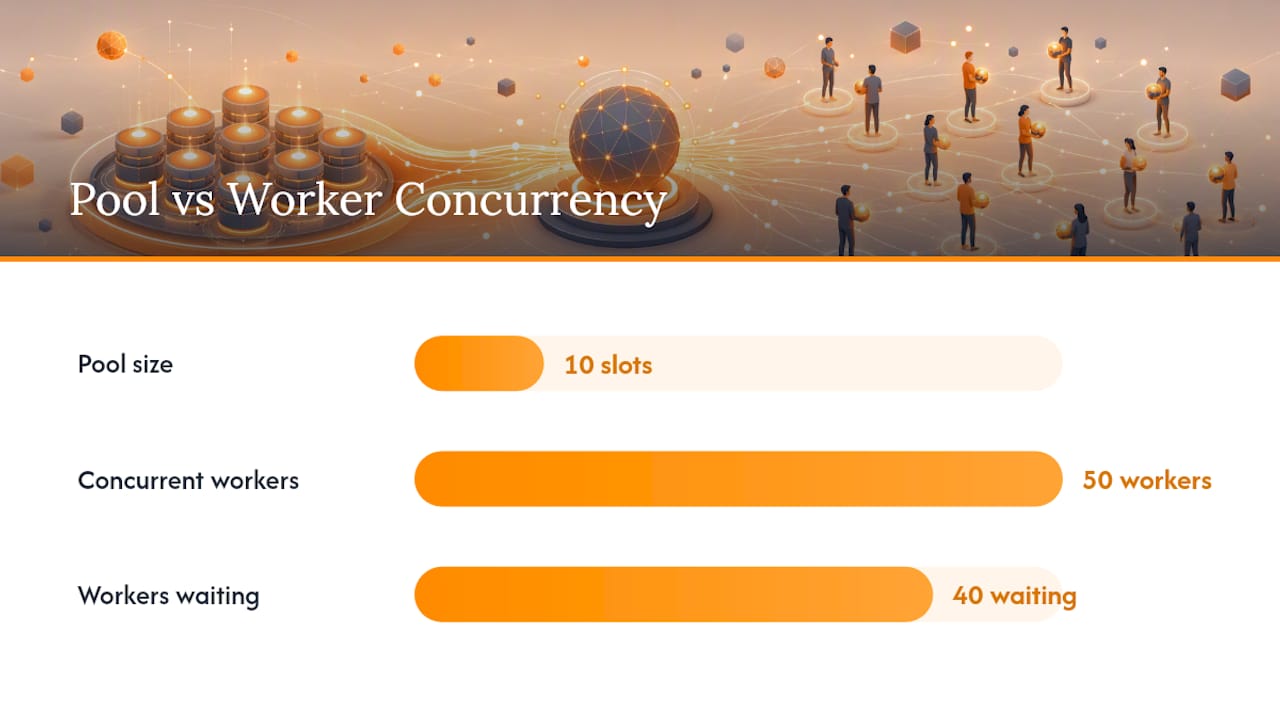
requests reuses TCP connections within a pool to avoid the overhead of a new handshake on every call. That's efficient when you're hitting one endpoint repeatedly through one proxy. It's less efficient when every request goes through a different proxy IP, since each new proxy effectively needs its own connection rather than reusing an existing one.
The practical fix isn't to abandon pooling. It's to size it correctly. Tuning pool_connections and pool_maxsize to match your worker concurrency keeps requests from silently queuing connections behind an undersized pool:
adapter = HTTPAdapter(pool_connections=100, pool_maxsize=100)
session.mount("https://", adapter)
session.mount("http://", adapter)
A pool sized for 10 connections while you're running 50 concurrent workers means 40 of those workers are waiting on a connection slot instead of doing work, and that shows up as mysterious latency that has nothing to do with the proxy itself.
You can also mount adapters selectively to change behavior per host:
- Mount a plain
HTTPAdapter(no proxy) on a specific host you need to reach directly, bypassing your default proxy configuration for that one domain. - Reuse a limited number of session objects per worker thread rather than creating a new session for every request, since session creation carries its own overhead at scale.
- Match
pool_maxsizeto your actual concurrency level, not an arbitrary round number, to avoid both starvation and wasted idle connections.
How Do You Verify a Proxy Is Actually Working?
Don't trust that a proxy is applied just because your script didn't throw an error. Verify it directly.
The fastest check is a request to an IP echo endpoint:
import requests

direct = requests.get("https://api.ipify.org/?format=json").json()
proxied = requests.get("https://api.ipify.org/?format=json", proxies=proxies).json()

print("Direct IP:", direct)
print("Proxied IP:", proxied)
assert direct != proxied, "Proxy is not being applied"
Running both calls side by side, direct and proxied, is more reliable than checking either one alone, since it confirms the proxy is doing something different rather than just returning a plausible-looking response.
A few more checks worth running before you trust a setup in production:
- Test
NO_PROXYbehavior explicitly by adding a domain to it and confirming that domain bypasses your proxy as expected. - Set
session.trust_env = Falseand rerun your test to confirm environment variables aren't silently overriding your explicitproxiesconfiguration. - Compare the
Proxy-Authorizationheader your script sends against what the proxy actually receives, since intercepting middleboxes occasionally strip or rewrite that header without throwing any visible error.
Security and Operational Hygiene for Proxy Credentials
A few habits separate a script that works on your laptop from one that's safe to run in a shared CI pipeline.
- Store proxy credentials in a vault or your CI provider's secrets manager, never in a plain
.envfile committed alongside your code. - Cap concurrency per individual proxy IP; hammering one address with dozens of simultaneous requests is one of the easier patterns for a target site to flag.
- Avoid strictly regular request timing. A scraper that fires exactly every 2.0 seconds is a more obvious fingerprint than one with natural jitter built in.
- Log enough to debug failures, but strip credentials from any URL before it hits a log line or error tracker.
- Respect the target site's terms of service and applicable law in your jurisdiction. Proxy rotation is a legitimate engineering tool, not a blanket exemption from either.
Pro Tip: Run a quick log audit with a regex search for
://.*:.*@across your log files before deploying to a shared environment. That pattern catches embedded credentials that slipped past a hasty review.
What Actually Matters When You're Using Proxies With Requests
Most tutorials on this topic front-load SOCKS setup and dictionary syntax, then treat rotation as an afterthought bolted on at the end. That ordering is backward for anyone running a scraper past a few hundred requests. The dictionary syntax takes five minutes to learn. Deciding when to rotate and when to hold a session steady is where scrapers actually break in production.
The overlooked point is that session affinity and rotation aren't competing strategies. They're sequential phases of the same scrape. Treating every request as independent because "rotation is good" breaks login flows. Treating every scrape as one long session because "affinity is simpler" gets you rate-limited by request twenty.
What the reader should prioritize first isn't the proxy config, it's the retry and health-check layer. A working proxies dict with no error handling behaves fine until the third proxy in your pool goes stale, and then the whole batch stalls silently instead of failing loud. Build the Retry adapter and the quarantine logic before you scale concurrency, not after something breaks in production.
— Daniel
Using Rotatingproxyhub for Managed Rotation in Requests
Writing your own rotation, health checks, and retry logic works fine until you're running hundreds of concurrent workers, and then the orchestration code becomes a bigger maintenance burden than the scraper it supports. Rotatingproxyhub hands that layer off entirely: you point requests at one endpoint, and rotation, health checks, and IP replacement happen behind it automatically.
The service supports both HTTP/S and SOCKS5 protocols, so the dictionary patterns covered throughout this article apply directly, no rewrite needed to switch providers. Country targeting lets you route requests through a specific region without managing your own regional proxy inventory, and the API handles assignment and rotation cadence instead of you writing that quarantine logic by hand. Developers running scraping, monitoring, or market research workloads at scale generally reach for a managed pool at the point where in-house rotation logic starts costing more engineering time than it saves.
If you want to test the pattern against your own scraper before committing, start with the free rotating proxies trial and swap the credentials into the proxies dict from Section 1.
Authoritative Docs and Test Endpoints
- Advanced Usage — Requests documentation for full
proxiesdict syntax and CA bundle handling. - Requests SOCKS install guidance for the
requests[socks]extra and PySocks setup. - Httpbin and
api.ipify.orgfor quick outward IP verification during testing.
Sources
- Advanced Usage — Requests documentation
- Requests documentation — Advanced (SOCKS and SSL)
- httpbin — ip endpoint