

To send PHP cURL requests through a proxy, set CURLOPT_PROXY to host:port, add CURLOPT_PROXYUSERPWD when the proxy requires credentials, and check curl_errno() before trusting the response. Here's the minimal version that works out of the box:
- Initialize the handle with
curl_init()and set the target URL. - Set
CURLOPT_PROXYto your proxy address, for example'11.22.33.44:8080'. - Set
CURLOPT_RETURNTRANSFERtotrueso the response comes back as a string instead of printing directly. - Execute with
curl_exec(), then checkcurl_errno($ch)and printcurl_error($ch)if it's non-zero.
$ch = curl_init('https://api.example.com/data');
curl_setopt($ch, CURLOPT_PROXY, '11.22.33.44:8080');
curl_setopt($ch, CURLOPT_RETURNTRANSFER, true);
$response = curl_exec($ch);
if (curl_errno($ch)) {
    echo 'Proxy request failed: ' . curl_error($ch);
}
curl_close($ch);
Leave off the port and cURL falls back to libcurl's default proxy port, and if you skip CURLOPT_PROXYTYPE entirely, libcurl assumes the proxy speaks HTTP. That default catches a lot of developers off guard the first time they try to point at a SOCKS5 endpoint.
TL;DR:
- Using
CURLOPT_PROXYandCURLOPT_PROXYUSERPWDproperly ensures your proxy requests include the correct host, port, and authentication data, with options to embed credentials in the URL or separate them.- Specifying
CURLOPT_PROXYTYPEor prefixing the proxy string with the scheme (like socks5://) prevents misrouting, especially when using non-HTTP proxy protocols such as SOCKS5.- Enabling
CURLOPT_HTTPPROXYTUNNELis essential for encrypting HTTPS traffic through proxies, ensuring end-to-end security by tunneling requests with the CONNECT method.- Incorporating
CURLOPT_VERBOSEand cross-checking with command-line curl helps diagnose and resolve proxy connection issues like refused connections, timeouts, or authentication failures.- Employing a proxy management platform, such as Rotating Proxy Hub, offloads IP rotation and regional targeting, reducing manual configuration and scaling complexity when handling large request volumes.
PHP cURL Proxy Examples for GET, POST, and Authentication
A GET request, a POST request with a JSON body, and an authenticated proxy connection cover the vast majority of real-world use cases. Each example below builds on the minimal snippet above with the specific options you'll actually need.
Proxied GET request:
$ch = curl_init('https://api.example.com/status');
curl_setopt($ch, CURLOPT_PROXY, '11.22.33.44');
curl_setopt($ch, CURLOPT_PROXYPORT, 8080);
curl_setopt($ch, CURLOPT_FOLLOWLOCATION, true);
curl_setopt($ch, CURLOPT_RETURNTRANSFER, true);
$response = curl_exec($ch);
curl_close($ch);
Splitting the address and port with CURLOPT_PROXYPORT instead of jamming both into one string keeps your config readable when the port comes from an environment variable, and it matches the official CURLOPT_PROXYPORT behavior for handling non-default ports.
Proxied POST with a JSON payload:
$ch = curl_init('https://api.example.com/submit');
curl_setopt($ch, CURLOPT_PROXY, '11.22.33.44:8080');
curl_setopt($ch, CURLOPT_POST, true);
curl_setopt($ch, CURLOPT_POSTFIELDS, json_encode(['status' => 'active']));
curl_setopt($ch, CURLOPT_HTTPHEADER, ['Content-Type: application/json']);
curl_setopt($ch, CURLOPT_RETURNTRANSFER, true);
$response = curl_exec($ch);
curl_close($ch);
Your proxy settings carry over unchanged when you switch from GET to POST. Only the request method options need to change.
Authenticated proxy example:
$ch = curl_init('https://api.example.com/data');
curl_setopt($ch, CURLOPT_PROXY, '11.22.33.44:8080');
curl_setopt($ch, CURLOPT_PROXYUSERPWD, 'username:password');
curl_setopt($ch, CURLOPT_RETURNTRANSFER, true);
$response = curl_exec($ch);
curl_close($ch);
You can also embed credentials directly in the proxy string using scheme://user:pass@host:port, which some teams prefer when pulling proxy configs from a single connection string. Both approaches produce identical requests on the wire, according to the GeeksforGeeks proxy tutorial, which documents this exact pattern alongside common error cases.
Pro Tip: Clear the default
Pragma: no-cacheheader withCURLOPT_HTTPHEADERwhen your proxy acts as a caching layer, since cURL sends it automatically and it can silently defeat the proxy's cache, per the PHP curl_setopt manual.
Which Proxy Protocols Does PHP cURL Support?
PHP cURL, through libcurl, supports HTTP, HTTPS, SOCKS4, SOCKS4a, and SOCKS5 proxies. You control which one it uses with CURLOPT_PROXYTYPE or by prefixing the proxy string with a scheme.
CURLPROXY_HTTP(the default when no type is set)CURLPROXY_SOCKS4for legacy SOCKS4 proxiesCURLPROXY_SOCKS4Afor SOCKS4a with remote hostname resolutionCURLPROXY_SOCKS5for standard SOCKS5 proxiesCURLPROXY_SOCKS5_HOSTNAMEfor SOCKS5 with remote DNS resolution
Setting curl_setopt($ch, CURLOPT_PROXYTYPE, CURLPROXY_SOCKS5) and prefixing the proxy string with socks5:// accomplish the same thing. The libcurl CURLOPT_PROXYTYPE documentation confirms that when you omit both, libcurl treats the proxy as HTTP by default, a detail that trips up developers migrating from a SOCKS5 provider without updating their code.
CURLOPT_HTTPPROXYTUNNEL matters when you're sending HTTPS traffic through an HTTP proxy or connecting to anything that isn't plain HTTP. Enabling it tells libcurl to issue a CONNECT request and tunnel the traffic end-to-end rather than letting the proxy inspect and forward it, which the CURLOPT_PROXY reference covers in detail alongside its notes on environment-variable behavior.
libcurl also honors http_proxy, https_proxy, ALL_PROXY, and NO_PROXY environment variables when no proxy option is explicitly set in code, with explicit CURLOPT_PROXY calls always taking precedence over the environment. Setting the proxy string to an empty value disables proxy use entirely, overriding any environment variable that would otherwise apply.
How Do You Authenticate to a Proxy in PHP cURL?
Most rotating and residential proxy providers require username and password authentication, and PHP cURL gives you three ways to supply it.
CURLOPT_PROXYUSERPWDaccepts a singleusername:passwordstring and is the most common approach for straightforward auth.CURLOPT_PROXYUSERNAMEandCURLOPT_PROXYPASSWORDsplit the credentials into two separate options, useful when you're pulling them from separate config keys or a secrets manager.- Embedding credentials in the proxy string itself with
scheme://username:password@host:portworks identically toCURLOPT_PROXYUSERPWDbut keeps everything in one line.
CURLOPT_PROXYAUTH controls which authentication scheme cURL negotiates with the proxy. CURLAUTH_BASIC sends credentials in plaintext-equivalent Base64 and works with nearly every proxy. CURLAUTH_NTLM supports Windows-based proxy servers using NTLM challenge-response. CURLAUTH_ANY lets cURL negotiate the strongest method the proxy offers, which is the safest default when you're not sure what the proxy supports.
Reach for the dedicated username/password options instead of embedding credentials in the URL string when that string might get logged, since request URLs frequently end up in access logs or error trackers. Store proxy credentials in environment variables or a secret manager rather than hardcoding them, and double-check that your error handling doesn't accidentally echo curl_getinfo($ch, CURLINFO_EFFECTIVE_URL) somewhere that includes embedded credentials.
Pro Tip: If a proxy request fails with an authentication error, test the exact same credentials with the command-line
curl -xflag first. It isolates whether the problem is your PHP code or the proxy account itself.
Why Is My PHP cURL Proxy Request Failing?
Most proxy failures in PHP cURL fall into a handful of predictable buckets, and matching the error message to the cause saves you from guessing.
- "Connection refused" almost always means the proxy port is closed or the proxy service isn't running at that address. Verify the port with a direct connection test before touching your code.
- "Timed out" points to reachability problems: a firewall blocking the port, a proxy that's overloaded, or a network path that simply can't reach the proxy host. Increasing
CURLOPT_CONNECTTIMEOUTwon't fix an unreachable proxy. - HTTP 407 (Proxy Authentication Required) means your credentials are missing, wrong, or the proxy expects a different
CURLOPT_PROXYAUTHscheme than what cURL negotiated by default. - Works locally but fails on the server usually traces back to outbound firewall rules on the hosting environment blocking the proxy's port, something that's easy to miss when your local machine has unrestricted outbound access.
Enable CURLOPT_VERBOSE and write the output to a stream to see the full negotiation, including the CONNECT request and response headers if tunneling is involved. Comparing that against a direct command-line curl -x host:port url -v call quickly tells you whether the issue lives in your PHP configuration or somewhere in the network path, a distinction that Stack Overflow's cURL-via-proxy discussions return to repeatedly.
DNS resolution is another common gotcha: HTTP proxies resolve hostnames on the proxy server by design, but plain SOCKS5 sometimes resolves locally unless you use CURLPROXY_SOCKS5_HOSTNAME to force remote resolution. That distinction matters if the target hostname only resolves correctly from the proxy's network.
Pro Tip: When debugging a proxy connection, check
curl_errno($ch)before you look at the response body. "Connection refused" and "timed out" carry different fixes, and reading the error text first stops you from chasing the wrong problem.
Rotating Proxies and Advanced Tunneling with PHP cURL
Automation at scale needs a rotation strategy, and PHP cURL doesn't handle that for you automatically. You have to build it into your request logic or lean on a provider that rotates IPs on its end.
- Per-request rotation assigns a new proxy for every
curl_exec()call, ideal for stateless scraping where each request stands alone. - Per-thread or per-worker rotation keeps one proxy fixed for the life of a worker process, useful when a target site fingerprints connection patterns across requests.
- Session-token rotation pins a proxy to a session identifier so a login flow or multi-step form submission stays on the same exit IP throughout.
Stateless, per-request rotation maximizes parallelism, while session pinning trades some throughput for consistency when a workflow genuinely needs it. Cookie jars via CURLOPT_COOKIEJAR and connection reuse through cURL's multi-handle interface both work fine alongside proxy rotation, as long as you're consistent about which proxy owns which session.
For cases where you need dynamic tunneling rather than a hosted proxy, an SSH -D dynamic tunnel exposing a local socks5h://127.0.0.1:port endpoint is a common pattern. The trailing "h" forces remote DNS resolution through the tunnel instead of leaking DNS queries to your local resolver.
HTTPS proxy support in libcurl has matured, but experimental negotiation flags for HTTP/2 and HTTP/3 proxy connections are still evolving. Test any newer transport flag against your specific proxy provider before relying on it in production, since support varies by libcurl build and proxy implementation.
Developers running scraping or monitoring pipelines at real volume typically end up documenting these rotation patterns in a shared internal guide. Rotatingproxyhub's use-case documentation walks through several of these patterns for teams building that kind of infrastructure.
Integrating Rotating Proxy Hub with PHP cURL
Rotating Proxy Hub supports HTTP/S and SOCKS5 protocols with both username/password and IP-based authentication, which maps directly onto the CURLOPT_PROXY and CURLOPT_PROXYUSERPWD options covered above. Automatic rotation and country targeting handle the "which proxy do I use next" problem at the account level instead of requiring you to build a rotation pool in your own code.
A typical integration flow looks like this:
- Pull the proxy host, port, and credentials from your Rotatingproxyhub dashboard or API.
- Set
CURLOPT_PROXYto the provided host:port andCURLOPT_PROXYUSERPWD(or the split username/password options) with your account credentials. - Enable
CURLOPT_VERBOSEfor your first test run to confirm the CONNECT handshake succeeds before scaling up request volume. - Point requests at country-targeted endpoints when a workflow needs region-specific results, without changing anything else in your cURL setup.
Developers running scraping, monitoring, or ad-verification workloads at scale can review rotating proxy use cases for patterns specific to their industry.
How Do You Handle Proxy Timeouts and Retries in PHP?
Proxy connections fail more often than direct connections, simply because there's an extra hop that can be slow, overloaded, or temporarily unreachable. Building retry logic around your cURL calls isn't optional at any real scale.
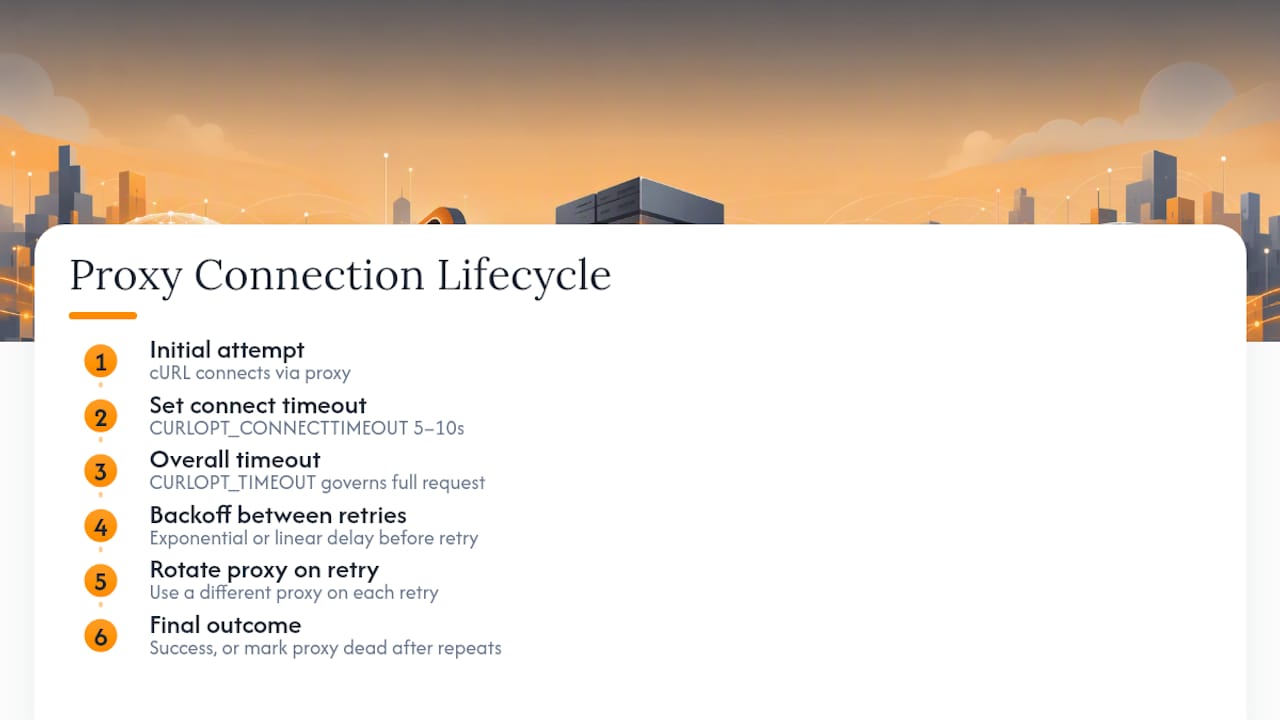
Set CURLOPT_CONNECTTIMEOUT to control how long cURL waits to establish the initial proxy connection, separate from CURLOPT_TIMEOUT, which governs the entire request lifecycle. A connect timeout of 5 to 10 seconds is reasonable for most datacenter proxies. Setting it too low causes false failures on proxies that are simply under momentary load, while setting it too high stalls your whole pipeline when a proxy is genuinely down.
A basic retry wrapper looks like this:
function fetchWithRetry($url, $proxy, $maxRetries = 3) {
    for ($attempt = 1; $attempt <= $maxRetries; $attempt++) {
        $ch = curl_init($url);
        curl_setopt($ch, CURLOPT_PROXY, $proxy);
        curl_setopt($ch, CURLOPT_CONNECTTIMEOUT, 8);
        curl_setopt($ch, CURLOPT_RETURNTRANSFER, true);
        $response = curl_exec($ch);
        $error = curl_errno($ch);
        curl_close($ch);
        if (!$error) {
            return $response;
        }
        sleep($attempt);
    }
    return false;
}
Exponential or linear backoff between attempts, rather than retrying immediately, gives a temporarily overloaded proxy time to recover. If you're rotating proxies, swap to a different proxy on retry instead of hammering the same failed one. A repeated timeout on one specific proxy in your pool usually means that proxy is dead, not that your timeout value is wrong.
Security Implications of Using Proxies in PHP cURL
Routing traffic through a proxy introduces a third party into every request, and that changes your security posture in ways worth thinking through deliberately.
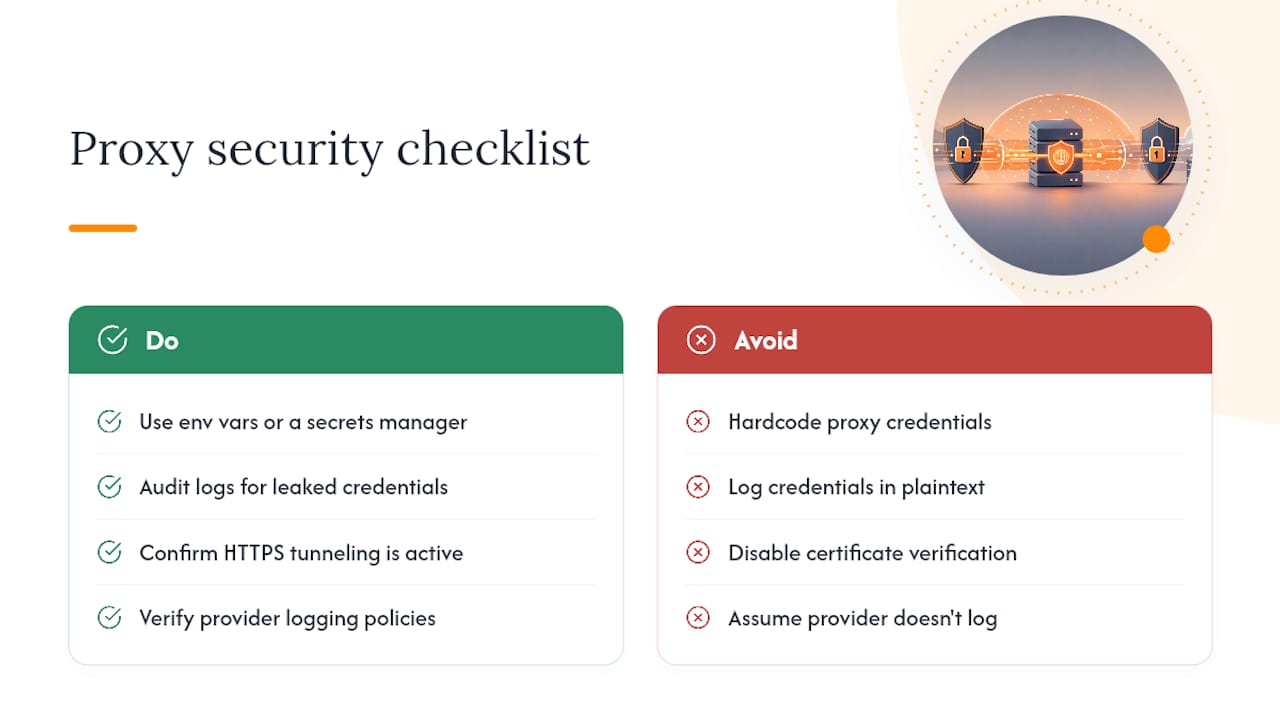
Proxy credentials are the most immediate risk. Hardcoding CURLOPT_PROXYUSERPWD values directly in source files means those credentials end up in version control history the moment someone commits the file. Pull credentials from environment variables or a secrets manager instead, and audit your logging to confirm request URLs, headers, or error output never capture them in plaintext.
Traffic visibility is the second concern. An HTTP proxy without CURLOPT_HTTPPROXYTUNNEL enabled can see and potentially modify unencrypted HTTP traffic passing through it. HTTPS traffic tunneled correctly through CONNECT stays encrypted end-to-end, so the proxy operator sees only the destination host, not the request content. Always confirm tunneling is active for any request carrying sensitive data.
Trusting a proxy provider also means trusting their infrastructure with your request metadata: source patterns, target URLs, and timing. Reputable datacenter proxy providers separate client traffic and don't log request content, but that's a claim worth verifying against a provider's actual documentation rather than assuming. CURLOPT_SSL_VERIFYPEER should stay enabled (the default) even when proxying, since disabling certificate verification to work around a proxy issue opens the door to man-in-the-middle interception on the destination connection itself, not just the proxy hop.
Debugging Proxy Connections in PHP cURL
CURLOPT_VERBOSE set to true, combined with CURLOPT_STDERR pointed at an open file handle, gives you the full negotiation transcript: the CONNECT request, response headers, and TLS handshake details if tunneling is active. This is the first thing to enable when a proxy request behaves differently than expected.
$verbose = fopen('php://temp', 'w+');
curl_setopt($ch, CURLOPT_VERBOSE, true);
curl_setopt($ch, CURLOPT_STDERR, $verbose);
curl_exec($ch);
rewind($verbose);
echo stream_get_contents($verbose);
curl_getinfo($ch) after execution returns a full array including connect time, total time, and the effective URL, which helps distinguish a slow proxy from a slow destination server. If connect_time is high but total_time isn't much higher, the proxy handshake itself is the bottleneck, not the target site.
Running the identical request through the command-line curl binary with the -x flag and -v for verbose output isolates whether a failure is PHP-specific or a genuine network or proxy issue. If the CLI request succeeds and the PHP version fails, check for PHP-side differences: a missing CURLOPT_HTTPPROXYTUNNEL, an incorrect CURLOPT_PROXYTYPE, or an outdated libcurl build bundled with your PHP installation. Version mismatches between local development and production servers are a frequent, easy-to-miss cause of "it works on my machine" proxy bugs.
What's the Best Default Proxy Setup for PHP cURL Projects?
An HTTPS-capable proxy with credentials passed through CURLOPT_PROXYUSERPWD, plus CURLOPT_HTTPPROXYTUNNEL enabled for anything beyond plain HTTP, covers the majority of production workloads without unnecessary complexity. SOCKS5 earns its place when you specifically need UDP support or you're routing through something like an SSH dynamic tunnel or Tor for a narrow use case.
Skip logging raw credential strings anywhere in your stack, including error handlers and monitoring tools. Test proxy behavior in your actual hosting environment before shipping. Local success does not guarantee the target server's firewall or DNS setup will behave the same way in production.
— Daniel
Get Proxies Built for PHP cURL Automation
Rotatingproxyhub cuts out the manual rotation logic this article just walked through: instead of building your own pool-management code, you get automatic IP rotation, country targeting, and both HTTP/S and SOCKS5 protocol support configured at the account level.
Point CURLOPT_PROXY at your assigned endpoint, drop your credentials into CURLOPT_PROXYUSERPWD, and the rotation, geographic targeting, and concurrency handling happen on Rotatingproxyhub's side rather than in your code. That means fewer lines to maintain and fewer edge cases to debug when a scraping job scales from hundreds of requests to hundreds of thousands. The platform's over 50,000 datacenter proxies across global locations make per-request rotation practical without running your own proxy pool.
Check out the rotating proxies product page for plan details, or start with the free rotating proxies trial to test the integration pattern from this article against your own PHP cURL code before committing to a subscription.
Key Takeaways
Reliable PHP cURL proxy requests depend on setting the correct protocol type, handling authentication securely, and building retry logic around the extra network hop a proxy introduces.
| Point | Details |
|---|---|
| Set proxy with two options | Use CURLOPT_PROXY for the host and port, adding CURLOPT_PROXYUSERPWD when authentication is required. |
| Match the protocol type | Use CURLOPT_PROXYTYPE or a scheme prefix; libcurl defaults to HTTP if you don't specify SOCKS4/5. |
| Enable tunneling for HTTPS | Turn on CURLOPT_HTTPPROXYTUNNEL so HTTPS traffic stays encrypted end-to-end through the proxy. |
| Debug with verbose output | Use CURLOPT_VERBOSE and compare results against a CLI curl -x test to isolate PHP-specific issues. |
| Offload rotation to a provider | Rotatingproxyhub handles automatic IP rotation and country targeting so you don't have to build your own proxy pool logic. |