

IP rotation is the practice of automatically cycling the IP address a script or browser uses between requests, so a target server sees traffic from many different addresses instead of one repeat visitor. You use it whenever a single IP would get rate-limited, blocked, or flagged as a bot, and it works because most anti-scraping systems key their defenses on IP reputation and request volume per address.
Fastest paths to working rotation today:
- Rotating datacenter proxies — sign up with a provider like Rotatingproxyhub, point your scraper at one gateway endpoint, and let automatic rotation assign new IPs per request or per session.
- Tor circuits — install Tor, use Stem or the control port to request a new circuit, and get free but slow anonymity.
- AWS API Gateway approach — deploy an extension like PortSwigger's ip-rotate or the Python library
requests-ip-rotatorto rotate outbound IPs through API Gateway endpoints.
As a starting rule of thumb, rotate every 10 to 20 requests or every 5 to 10 minutes, tightening that window against sites with aggressive rate limiting.
Key Takeaways
Reliable IP rotation depends on a diverse, health-checked IP pool matched to the right rotation policy, not just swapping addresses at random.
| Point | Details |
|---|---|
| Match method to use case | Scraping favors rotating proxies; privacy favors Tor; geo-testing needs country-targeted pools. |
| Rotate on a sensible cadence | Start around every 10 to 20 requests or every 5 to 10 minutes, then tighten based on target defenses. |
| Sanitize cloud headers | Strip or randomize X-Forwarded-For and similar headers before relying on API Gateway rotation. |
| Monitor pool health continuously | Probe proxies for uptime and blacklist status, and retire flagged IPs automatically. |
| Managed rotation reduces overhead | Rotatingproxyhub handles rotation, country targeting, and failover across a 50,000-plus proxy pool. |
What Is IP Rotation and How Does It Differ From Proxy Rotation?
IP rotation refers to the general act of changing the IP address your traffic originates from over time, whether through a proxy pool, a VPN server switch, Tor circuits, or a cloud gateway. Proxy rotation is a specific implementation of that idea, where a proxy provider's infrastructure automatically swaps out the IP behind each request or session. Every proxy rotation is IP rotation, but not every IP rotation method involves a proxy.
A few terms you'll run into constantly once you start building this:
- Rotating proxy: a proxy endpoint that assigns a different backend IP automatically, either per request or on a timer.
- Sticky session (sticky proxy): a rotation mode where the same IP is held for a defined window, useful when a target site tracks login state or shopping carts.
- IP pool: the set of addresses a rotation system draws from; bigger and more diverse pools reduce the odds of reuse patterns getting flagged.
- Per-request vs. time-based rotation: per-request swaps the IP on every call, which suits high-volume scraping; time-based rotation holds an IP for a set duration, which suits workflows needing session continuity.
Choose sticky sessions when a workflow depends on maintaining state. Choose per-request rotation when each call is independent and anonymity per hit matters more than continuity.
Which Use Cases Call for Which Rotation Method?
Different goals call for different rotation strategies, and picking the wrong one wastes either money or effort. Here's how the common cases break down:
- Web scraping and automation: high request volume favors rotating datacenter or residential proxies with per-request or burst rotation.
- Privacy and anonymity: Tor or a reputable VPN with rotating exit servers fits better than a scraping-grade proxy pool.
- Bypassing geo-restrictions: geo-targeted rotating proxies with country selection outperform Tor, since Tor's exit nodes are unpredictable by location.
- Ad verification: geographically diverse rotating proxies let you see the ad creative a real user in that region would see.
- Fraud and bot-detection testing: a mix of residential and datacenter IPs stresses detection systems the way real attackers would.
- Load testing: a large, disposable IP pool matters more than geographic precision.
Low-volume research projects can often get by with Tor or a handful of proxies. High-concurrency scraping jobs need a pool large enough that no single IP gets hit often enough to trip a rate limit.
Pro Tip: Match your rotation frequency to your use case before you match it to a tool. A geo-verification job needs country accuracy more than speed; a scraping job needs speed more than geographic precision.
What Methods Are Available for Rotating IPs?
Five approaches cover almost every automation scenario, each with distinct tradeoffs in cost, scale, and setup complexity.
Rotating proxies (datacenter and residential) work through a backconnect gateway: you send requests to one endpoint, and the provider's infrastructure swaps the exit IP behind it automatically. Datacenter proxies are faster and cheaper per IP; residential proxies look more like genuine home connections but cost more and throttle throughput. Authentication is typically username and password or IP whitelisting.
VPN rotation switches you between VPN server locations, which is convenient for a single browsing session but rarely holds up for scraping. Most consumer VPN apps support one active connection per device, so concurrency is capped hard, and rotating servers manually doesn't scale to thousands of parallel requests.
Tor routes traffic through a chain of relays and rebuilds circuits to change your exit IP, which makes it excellent for anonymity but a poor fit for high-throughput scraping. Circuit rebuilding takes time, throughput is limited by relay bandwidth, and Tor exit nodes carry distinct fingerprinting signatures that some sites specifically detect and block.
Cloud/API gateway techniques, like the pattern behind PortSwigger's ip-rotate extension, route requests through AWS API Gateway endpoints spun up across regions, giving you a nearly unlimited pool of outbound IPs. The tradeoff is that cloud-provider infrastructure headers can leak your traffic's true origin unless sanitized, and some sites fingerprint the traffic patterns of major cloud ranges.
Local or OS-level scripts, such as a Bash utility that cycles network interface addresses on a timer, are useful for quick local testing but can't replicate the ISP and subnet diversity that real scraping at scale requires.
| Method | Setup effort | Typical scale | Common auth pattern |
|---|---|---|---|
| Rotating proxies | Low | High | Username:password or IP auth |
| VPN rotation | Low | Low | App login |
| Tor | Medium | Low | None (SOCKS proxy) |
| Cloud/API gateway | Medium to high | High | API keys, cloud credentials |
| Local scripts | Low | Very low | None (local network) |
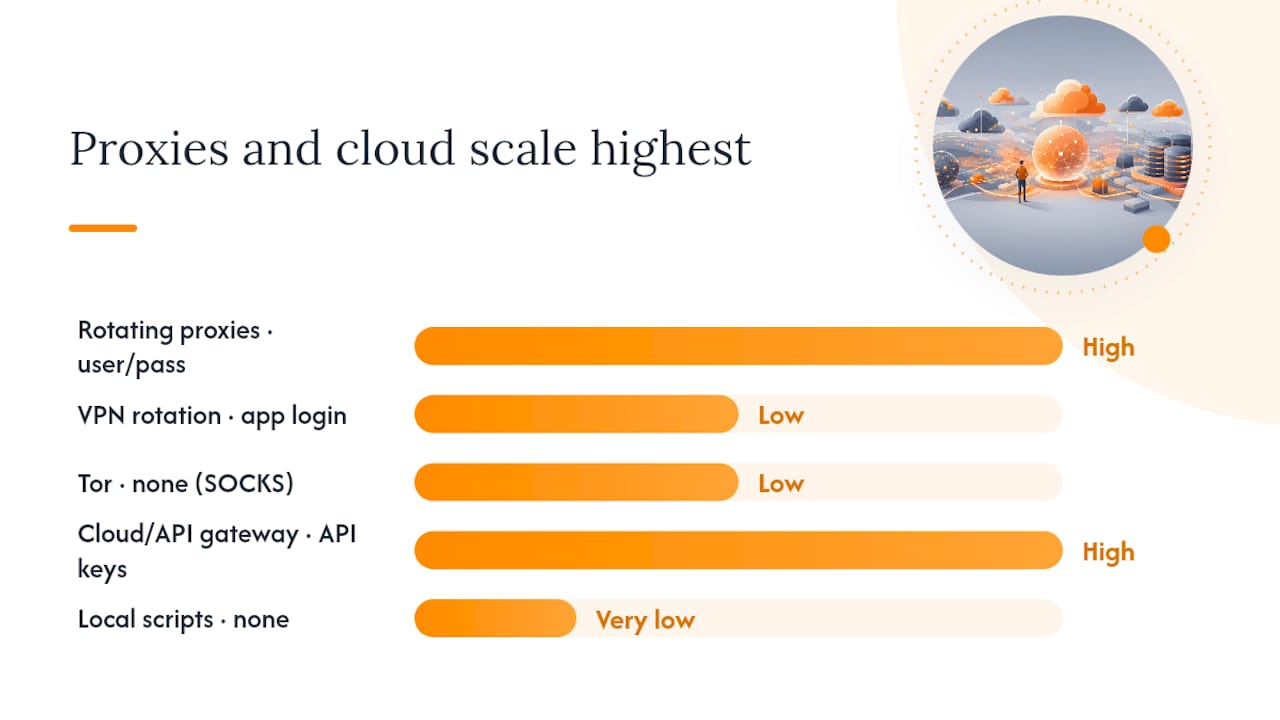
Pro Tip: If your automation needs to run unattended for weeks, skip anything that requires manual server switching. Rotating proxies and API gateway approaches are the only two methods on this list built for hands-off operation.
How Do You Build a Reliable Rotation Strategy?
A rotation policy that survives contact with a real target site needs more than "change the IP sometimes." Structure it deliberately:
- Pick a rotation policy: per-request for maximum anonymity, per-n-requests (burst) to balance speed and stealth, time-based for session continuity, or intelligent rotation that adapts based on response codes.
- Size your pool for diversity, not just count: spread requests across different subnets, ISPs, and countries rather than cycling through IPs that all belong to the same block.
- Decide session handling upfront: use sticky sessions for logins, carts, or multi-step flows; use per-request rotation for stateless data pulls.
- Clean up request hygiene: rotate user-agent strings alongside IPs, vary header order, and randomize timing so requests don't arrive at mechanically identical intervals.
- Build in backoff and failover: apply exponential backoff on errors, probe proxies for health before reuse, and automatically retire any address that returns a block or captcha.
A consistent workflow that works across most stacks: build the pool, assign IPs per request using a policy such as round-robin, random, or least-used, then monitor proxy health continuously and swap out anything degraded.
Pro Tip: Never treat a proxy pool as "set and forget." A pool that isn't probed for health will quietly rot as providers retire or blacklist addresses, and you won't notice until your success rate collapses. A few things to avoid outright:
- Don't mass-rotate through low-quality or previously-flagged proxies just to hit a volume target.
- Don't leave static, identifiable headers (like a fixed
User-Agentor leakedX-Forwarded-For) sitting behind a rotated IP. - Don't ignore a target's terms of service or rate-limit signals just because rotation makes blocking harder to trigger.
What Tools and Libraries Support IP Rotation?
You rarely need to build rotation logic from scratch. A handful of stacks cover most needs:
- Python
requests: mount a rotating proxy or an API Gateway session viarequests-ip-rotator, which handles endpoint creation and IP randomization for you. - Selenium: attach a proxy configuration to the browser profile at launch, refreshing it per session for browser-based automation.
- Tor + Stem: the Stem controller library lets you issue new circuit requests programmatically instead of relying on manual browser restarts.
- Burp Suite extensions: PortSwigger's ip-rotate plugs directly into Burp for security testing workflows that need per-request IP changes.
For commercial options, you'll mainly encounter three service classes: rotating datacenter proxies (fast, affordable, best for high-volume automation), residential or backconnect proxies (slower, pricier, better at mimicking real user traffic), and proxy-as-a-service APIs with dashboard controls for country targeting and session management. Broader code discovery is easy through GitHub's ip-rotation topic, which aggregates community repos across languages.
How Do You Implement IP Rotation in Code?
Four patterns cover most automation stacks, from lightweight scripts to browser automation and anonymity networks.
- Python requests with a proxy pool: mount a rotating proxy gateway as your session's proxy dictionary (
session.proxies = {"http": proxy_url, "https": proxy_url}), and let the gateway assign a new IP per call rather than rotating manually in your loop. - Selenium with proxies: pass proxy settings into the browser capabilities before launching the driver, then rotate by starting a fresh driver session with a new proxy assignment rather than mid-session.
- Tor with Stem: connect to Tor's control port with Stem, send a
NEWNYMsignal to request a fresh circuit, and wait for the circuit to fully establish before sending the next request. - Burp Suite with AWS API Gateway: install the ip-rotate extension, supply AWS credentials, select target regions, and enable the extension so Burp routes traffic through freshly created gateway endpoints. Always delete the gateway resources when you're done to avoid dangling public endpoints.
Pro Tip: Sanitize outbound headers before you rely on any cloud-based rotation method. AWS API Gateway traffic can carry identifying headers like X-Forwarded-For and X-Amzn-Trace-Id that reveal your real origin unless you strip or randomize them.
- Tear down cloud gateway endpoints immediately after a job finishes.
- Verify header sanitation before running any production job through a gateway-based rotation setup.
- Log every proxy swap so failed requests can be traced back to a specific IP.
What Are the Legal and Ethical Risks of Rotating IPs?
Rotation makes it easier to send more requests without getting blocked, which raises the stakes if you're not careful about what you're accessing and how. Follow the target site's terms of service, respect any legal restrictions on the data you're collecting, and never use rotation to bypass authentication or access controls you're not authorized to cross.
Operationally, the biggest risks are quieter than a legal notice: header-based data leakage from cloud gateways, unexpected cloud billing from orphaned endpoints, and fingerprinting based on traffic patterns rather than IP reputation alone.
Respect
robots.txtdirectives where a site publishes them, keep request rates proportional to what a human user would generate, and remember that a large IP pool doesn't grant permission to ignore access controls.
This is general operational guidance, not legal advice. Consult counsel for any high-risk or large-scale data collection project.
How Do You Confirm IP Rotation Is Actually Working?
Check your outbound IP against a simple echo endpoint or header inspector before and after each rotation to confirm the address actually changed, and cross-reference the result with a geo/ASN lookup tool to verify the location and provider match expectations.
- Compare
X-Forwarded-ForandViaheaders across requests to catch a gateway that isn't rotating as configured. - Distinguish block types: a
403or429usually signals a rate or reputation block, a captcha signals behavioral suspicion, and a silent content mismatch often signals fingerprinting rather than IP blocking. - Isolate the failure layer: test the proxy directly with a curl request before assuming your scraping code is broken.
- Run continuous uptime probes and blacklist checks against your pool, and automate replacement of any IP that fails a health check.
Should You Build IP Rotation In-House or Use a Managed Service?
Building your own rotation stack makes sense for small research projects or when you need full control over routing logic. Once you're running concurrent high-volume jobs, the operational overhead of maintaining IP pools, health checks, and cloud teardown scripts usually costs more than a subscription. For most production scraping and monitoring workloads, a managed rotating proxy service with built-in country targeting and automatic failover, like Rotatingproxyhub, removes that maintenance burden entirely.
Get Automatic IP Rotation Without Managing Infrastructure
Between Tor's throughput limits and the cloud-gateway approach's header leakage risks, most automation teams eventually want something that just works without babysitting endpoints or sanitizing infrastructure headers by hand. Rotatingproxyhub runs the rotation logic for you: automatic IP assignment on every request or session, country targeting across a pool of over 50,000 datacenter proxies, and access over both HTTP/S and SOCKS5 through a dashboard or API.
Plans support concurrent sessions with unlimited bandwidth, so scraping jobs that would choke a single-connection VPN or a hand-rolled proxy pool run without added throttling. Authentication works through either username and password or IP whitelisting, so it drops into existing Python, Selenium, or custom automation stacks with minimal rewrites. If you're currently duct-taping together Tor circuits or API Gateway endpoints, start with a free rotating proxy trial to compare block rates against your current setup, or go straight to the rotating proxy plans built for automation workloads.
Where Can You Learn More About IP Rotation Implementation?
Consult Tor's own documentation for anonymity-focused rotation, PortSwigger's readme for the AWS API Gateway extension pattern, and the requests-ip-rotator package page for the Python implementation.
- Tor Project for circuit-based anonymity guidance
- Tor Browser circuit documentation for identity reset steps
- PortSwigger ip-rotate on GitHub for the Burp/AWS pattern
- requests-ip-rotator on PyPI for the Python library
- Web scraping rotation guide for workflow best practices
Frequently Asked Questions
What is IP rotation used for? IP rotation lets automated scripts send high volumes of requests without one address triggering rate limits, blocks, or captchas, and it's used across scraping, ad verification, and geo-testing workflows.
How often should you rotate IPs for scraping? A common starting guideline is every 10 to 20 requests or every 5 to 10 minutes, adjusted tighter against sites with aggressive anti-bot defenses.
Is Tor good for web scraping? Tor works for low-volume, anonymity-focused tasks but struggles with high-throughput scraping because of its circuit-rebuilding latency and limited relay bandwidth.
Do rotating proxies work with Selenium? Yes. You attach proxy settings to the browser profile at launch and rotate by starting a new session with a fresh proxy assignment rather than mid-session.
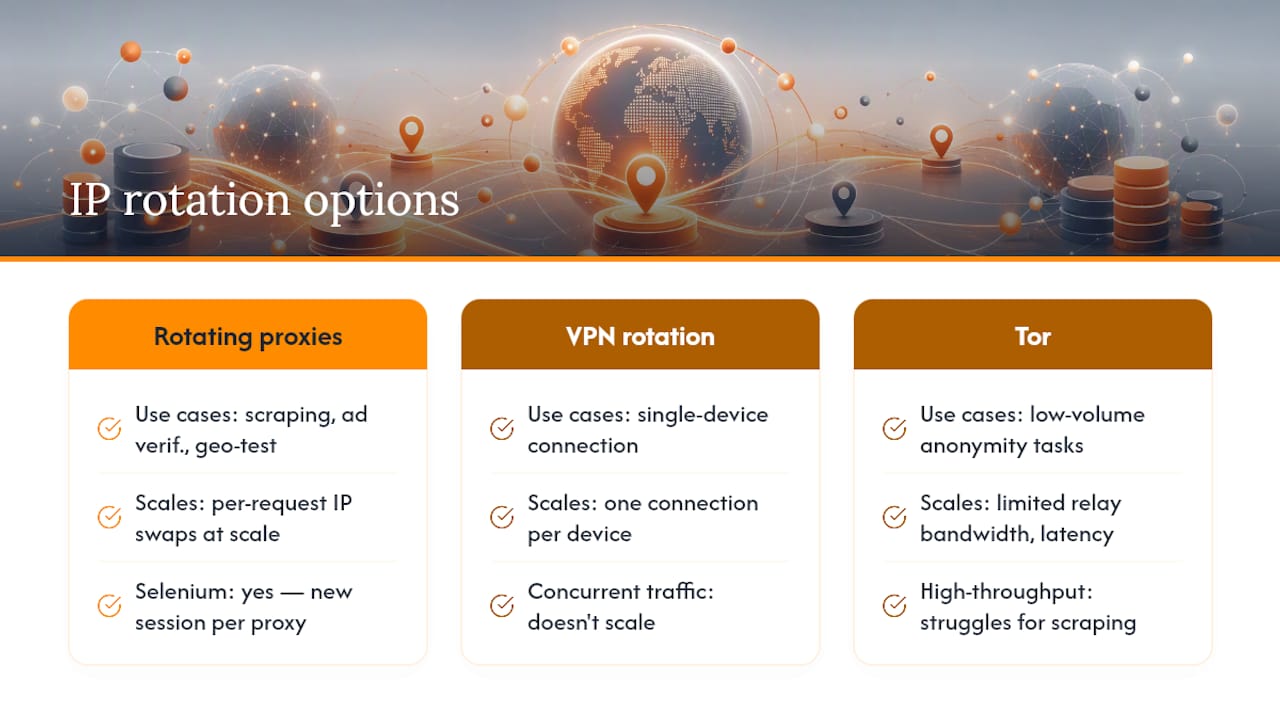
What's the difference between proxy rotation and VPN rotation? Proxy rotation is built for automation, handling per-request IP swaps at scale through a gateway, while VPN rotation typically supports one connection per device and doesn't scale to concurrent automated traffic.
Sources
- Torproject
- Support
- PortSwigger/ip-rotate
- requests-ip-rotator v1.0.18
- Web Scraping Tool Guide: Rotate IP Address with a Proxy Server