

For protected targets and production-scale scraping, start with residential or ISP/static-residential proxies. For unprotected sites, QA work, or raw throughput needs, datacenter proxies are the faster and cheaper choice. The split comes down to detection risk versus speed: anti-bot systems like Cloudflare Bot Management and Akamai Bot Manager flag hosting-origin IPs by default on defended sites, while a rotating proxy service like Rotatingproxyhub still handles high-volume, low-defense jobs at a fraction of the cost per request.
- High-value retail or ticketing scraping → residential or ISP/static-residential
- Bulk public data downloads → datacenter
- Internal QA and staging tests → datacenter
- Account management or checkout flows → residential or ISP/static-residential
- SEO rank tracking on moderately defended search engines → residential, sometimes datacenter for low-competition queries
Key Takeaways
Effective throughput, not raw speed, determines the right proxy choice, and residential or ISP proxies typically win on protected targets despite higher per-request cost.
| Point | Details |
|---|---|
| Match proxy to defense level | Use residential or ISP/static-residential on protected targets, datacenter on open ones. |
| Measure effective throughput | Calculate successful requests per hour, not raw response time, before choosing a pool. |
| Watch ASN reputation | Anti-bot systems flag hosting ASNs via WHOIS and BGP checks before behavioral analysis even runs. |
| Test before scaling | Run small controlled samples to measure block rate before committing budget to any sourcing model. |
| Rotatingproxyhub for speed-first jobs | Rotatingproxyhub's rotating datacenter proxies suit monitoring, QA, and bulk collection where cost and concurrency matter most. |
What Are Datacenter Proxies?
A datacenter proxy is an IP address provisioned from a hosting provider or server farm rather than a home internet connection. These IPs live on hosting ASNs, get forwarded through HTTP/S or SOCKS5 gateways, and typically arrive as either rotating pools or static IP:Port lists.
Key technical traits:
- Low latency and high concurrency — server-grade uplinks handle thousands of simultaneous connections without the variability of consumer networks.
- Consistent throughput — request times stay predictable because there's no reliance on residential last-mile bandwidth.
- ASN and hosting fingerprint — every datacenter IP traces back to a known hosting range, which is exactly what makes it detectable.
- Standard auth patterns — username:password authentication and IP allowlisting are the norm, alongside both IPv4 and IPv6 pools depending on provider.
Developers appreciate datacenter proxies for their simplicity: spin up a gateway, authenticate, and start sending requests with minimal setup overhead.
What Are Residential Proxies?
Residential proxies use IP addresses assigned by consumer ISPs to real households, which is why anti-bot systems treat this traffic as a genuine home user rather than a server. That single distinction is the whole reason residential pricing runs higher than datacenter.
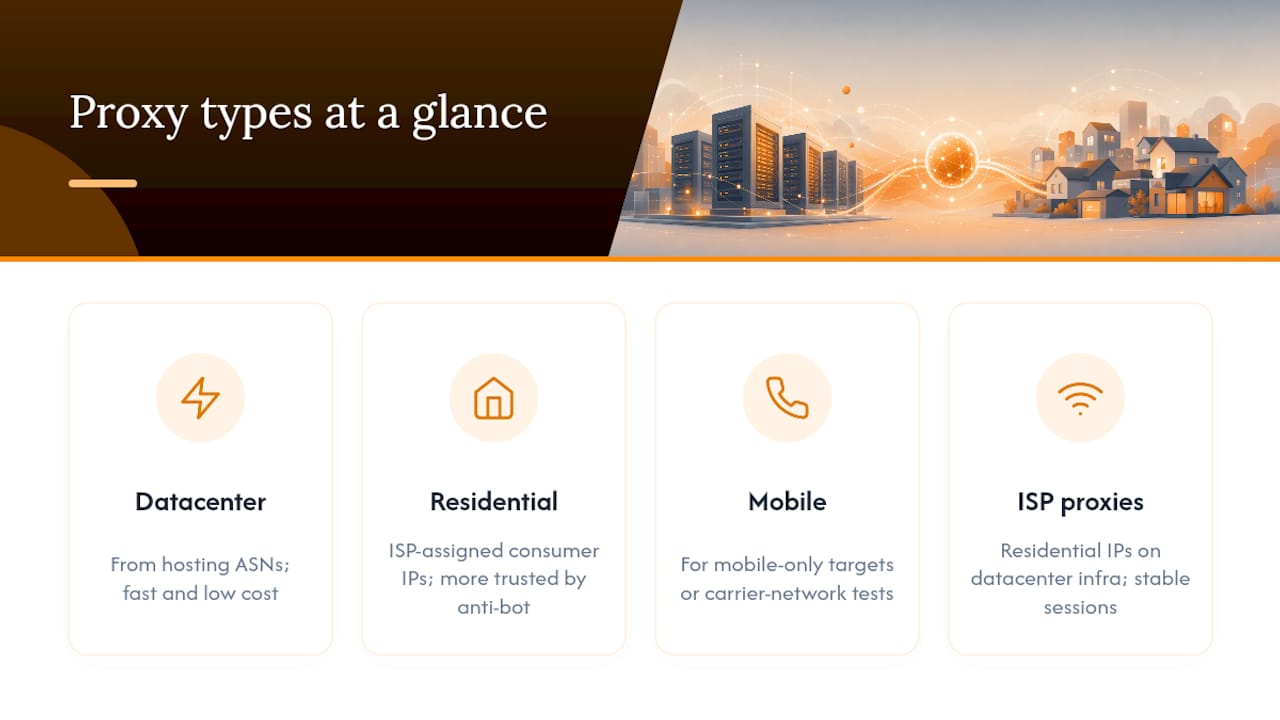
Residential proxies come in several flavors, each with a different trust-to-performance trade-off:
- Rotating residential — a new IP on every request or every few minutes, best for high-volume anonymous scraping.
- Sticky sessions — the same IP holds for a set window (often 10 to 30 minutes), useful for multi-step workflows like logins or checkouts.
- Static residential/ISP proxies — a fixed residential-class IP with datacenter-grade stability.
- Mobile proxies — IPs from cellular carriers, reserved for mobile-only targets or anti-fraud testing.
Authentication generally mirrors datacenter setups (username:password or whitelisted IPs), but rotation is configured through session parameters rather than raw IP swapping.
How Are Datacenter and Residential Proxies Sourced Differently?
Datacenter IPs come from hosting ASNs, blocks of addresses that cloud providers and data centers register and lease out in bulk. Residential IPs trace back to consumer ISPs or, in some networks, peer-to-peer apps that route traffic through real users' devices in exchange for free services.
That second sourcing model deserves scrutiny. Ask any residential proxy vendor how their pool is built before buying volume:
- Does the provider disclose ASN ranges or sourcing documentation on request?
- Is IP acquisition consent-based, or does it run through opaque peer-network SDKs bundled into unrelated apps?
- Can the provider explain how residential exit nodes get onboarded and rotated out?
Pro Tip: Before committing to a large residential pool, ask the vendor for a sample sourcing breakdown by country and ASN. A provider that can't produce this in a sales call usually can't produce it under audit either.
Which Is Faster: Datacenter or Residential Proxies?
Raw speed favors datacenter proxies without much debate. Datacenter proxies excel at low latency, high concurrency, and cost efficiency, typically returning responses in well under a second on unblocked targets, with tight, predictable jitter because the traffic never leaves professional network infrastructure.
Residential connections route through home broadband or mobile networks, so latency and jitter run higher and less consistent. But raw speed is the wrong metric for scraping at scale. What matters is effective throughput, meaning successful requests per hour, not requests attempted per hour.
Statistic Callout: A datacenter proxy returning a fast response is ineffective if a large share of requests get blocked. At a moderate success rate, the effective throughput of datacenter proxies can be substantially lower than residential proxies on protected targets, despite faster raw response times, due to higher block rates.
Run that math before choosing a proxy type based on benchmark speed alone. Block rate, not response time, decides which option actually finishes the job faster.
Why Do Residential Proxies Have Higher Success Rates?
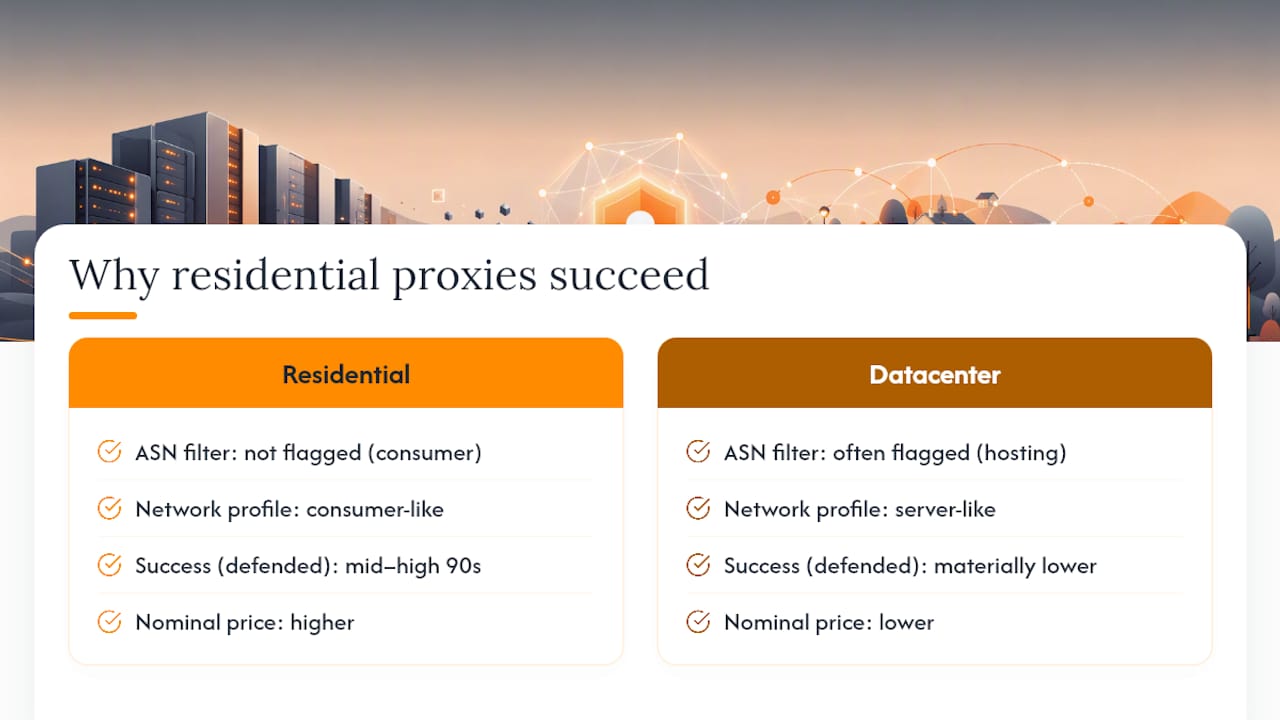
Anti-bot platforms like Cloudflare Bot Management, PerimeterX, and Akamai Bot Manager don't just look at request patterns. They cross-reference WHOIS records, BGP routing tables, and ASN reputation databases before a request even reaches behavioral analysis. Hosting-origin IP ranges get flagged by default on high-value targets precisely because that ASN-level check happens first.
Residential IPs pass that initial filter because they're indistinguishable from genuine consumer traffic at the network layer. Some vendor and industry reporting puts residential success rates on defended targets in the mid-to-high 90s, with datacenter block rates running materially higher on the same sites, though exact figures depend heavily on the target and provider, so treat any number as a starting hypothesis to verify, not a guarantee.
Statistic Callout: Due to differing success rates on protected targets, the effective cost per successful request may end up similar between datacenter and residential proxies, despite differences in nominal pricing models.
Pro Tip: Test any new target incrementally. Send 100 requests with a datacenter proxy, log the block rate, then repeat with a residential sample before committing budget to either sourcing model.
How Much Do Datacenter and Residential Proxies Cost?
Pricing models diverge sharply between the two. Datacenter proxies bill per IP per month or per concurrent thread, since the cost driver is server capacity, not data volume. Residential proxies bill per GB of bandwidth, since the cost driver is renting access to a distributed consumer network. ISP/static-residential plans often blend the two, charging a flat rate per static IP with generous bandwidth caps.
- Datacenter: $1 to $5 per IP/month or per-thread pricing, unlimited bandwidth common.
- Residential: $3 to $15 per GB depending on geo-targeting and provider.
- ISP/static-residential: flat per-IP pricing similar to datacenter, but at a premium reflecting the residential ASN.
Pro Tip: Always calculate effective cost per successful page, not nominal price per GB or per IP. A cheap proxy with a high block rate is rarely the cheap option once you account for retries.
Which Proxy Type Fits Your Scraping Task?
Matching proxy type to task saves both budget and engineering time. The table below reflects common patterns across scraping and automation workloads.
For workflows like SEO monitoring or market research, the right starting point depends entirely on how aggressively the target site defends itself, not on habit or what worked last time.
Should You Use ISP or Mobile Proxies Instead?
ISP/static-residential proxies place residential-class IPs on datacenter-grade infrastructure, giving you the trust profile of a home IP with the session stability of a hosted server. That combination makes them the natural upgrade path once you need persistent sessions, like checkout automation or logged-in account management, without the connection drops that plague rotating residential pools.
Mobile proxies matter for a narrower slice of work: mobile-only ad verification and carrier-level anti-fraud testing, where a request needs to originate from an actual cellular network to look legitimate.
Datacenter vs Residential vs ISP Proxies at a Glance
| Dimension | Datacenter | Residential | ISP/Static-Residential |
|---|---|---|---|
| Speed/latency | High | Medium | High |
| Success rate on protected targets | Low to medium | High | High |
| Pricing model | Per-IP or per-thread | Per-GB bandwidth | Per-IP, premium flat rate |
| Geo accuracy | Broad, country-level | Deep, city-level | Deep, city-level |
| Pool size/rotation | Wide pool, easy rotation | Wide pool, flexible sessions | Narrower pool, fixed sessions |
| Protocols supported | HTTP/S, SOCKS5 | HTTP/S, SOCKS5 | HTTP/S, SOCKS5 |
| Best use cases | QA, bulk downloads, monitoring | Protected scraping, account tasks | Persistent sessions, checkout flows |
Values here are qualitative and drawn from patterns across datacenter and residential proxy documentation. Actual performance varies by provider, target site, and region, so treat this as a starting framework rather than a guarantee.
How Do You Configure Proxies for Scraping at Scale?
Start with target profiling: pull a small sample, usually a few hundred requests, and measure block rate before committing to a sourcing model or a large budget. Watch for soft-fail signals like CAPTCHA walls or silently degraded content, not just hard 403 errors.
Configuration basics worth locking down early:
- Rotation interval — per-request rotation for anonymous browsing, sticky sessions for anything involving login state.
- Header and cookie handling — match real browser header order, and persist cookies across a session's lifetime.
- TLS version and user-agent strategy — keep TLS handshakes and user-agent strings internally consistent; mismatches are an easy fingerprinting signal.
- Concurrency limits — scale gradually and watch error rates rather than maxing out threads on day one.
Track success rate, retry count, average latency, country-mapping accuracy, and error-class breakdown as your core monitoring metrics. A developer guide to proxy-based scraping covers implementation patterns for these configurations in more depth.
Pro Tip: Log error classes separately from block events. A spike in timeouts often means concurrency is too high, not that your IPs are burned.
How Do You Test Proxy Performance Before Scaling?
A reproducible test takes four steps:
- Run a controlled sample of requests against the target with identical headers and timing intervals.
- Record HTTP status codes, challenge pages, and successful page loads separately.
- Calculate block rate, average round-trip time, and retries needed per successful page.
- Repeat across datacenter, residential, and ISP pools to compare effective throughput, not just raw speed.
Metrics worth capturing every run: block rate, average RTT, time to first byte, and retries per successful page. Popular platforms like WordPress sites often behave differently under caching layers, so test against the actual CMS stack the target runs, not a generic benchmark. The broader pattern practitioners keep reporting: anti-bot defenses have matured enough that datacenter IPs get blocked by default on high-value targets, pushing serious production scraping toward residential or hybrid sourcing.
What's the Right Starting Choice for Production Scraping?
For most production pipelines, prioritize residential or ISP/static-residential proxies first, then fall back to datacenter for internal or low-defense targets. Two starter patterns:
- Rotating call: authenticate via username:password, rotate per request, cap concurrency low initially.
- Sticky session: hold one IP for 10 to 30 minutes for login flows, then rotate.
Checklist before scaling: confirm block rate on a small sample first.
What Have We Learned Running Proxies in Production?
The recurring lesson is that speed and trust trade off directly, and most teams initially overweight speed. Datacenter pools look attractive in a benchmark, then quietly fail once a target's anti-bot layer matures. The teams that succeed long term tend to migrate persistent workflows toward ISP/static-residential proxies early rather than waiting for a block-rate crisis to force the switch.
Operationally, three habits separate stable pipelines from fragile ones: start with small test batches before committing budget, monitor soft-fail signals like degraded content rather than only hard blocks, and demand sourcing transparency from any residential provider before scaling volume. Practitioner communities and industry podcasts are useful for catching emerging fingerprinting trends. Validate anything you hear there with your own controlled tests.
How Rotatingproxyhub Fits Your Scraping Stack
Rotatingproxyhub is built for exactly the workloads where datacenter proxies still win: high-concurrency automation, QA testing, website monitoring, and bulk data collection where speed and cost per request matter more than passing consumer-grade trust checks. The platform gives you automatic IP rotation across more than 50,000 proxies, country targeting, and both HTTP/S and SOCKS5 protocols, all accessible through an API or dashboard with unlimited bandwidth on every plan.
If your workflow matches the datacenter column in the comparison table above, whether that's website monitoring, QA automation, or AI data collection at volume, this is the faster and cheaper starting point. For workflows that need residential or ISP-grade trust, like checkout automation or protected retail scraping, the decision framework above still applies. Start with a free rotating proxy trial to measure your actual block rate on your actual target before committing to a plan.
Frequently Asked Questions
What is the main difference between datacenter and residential proxies? Datacenter proxies originate from hosting provider ASNs and offer speed and low cost, while residential proxies use ISP-assigned consumer IPs that anti-bot systems trust more readily.
When should you use mobile proxies instead of residential or datacenter? Reserve mobile proxies for mobile-only targets or anti-fraud testing that specifically requires traffic originating from a cellular carrier network.
Are datacenter proxies illegal or against the law? Proxy technology itself is legal in most jurisdictions; legality depends on what you scrape and each target site's terms of service, so review those terms and applicable data laws for your specific use case.
How do ISP proxies differ from regular residential proxies? ISP proxies run residential-class IPs on datacenter-grade infrastructure, giving them consumer-level trust with the session stability and lower latency typical of hosted servers.
Can datacenter proxies work for scraping protected sites at all? They can, but expect materially higher block rates on defended targets. Many teams use datacenter proxies for initial testing, then switch to residential or ISP proxies for production runs.
Sources
For deeper technical grounding beyond this guide, these sources cover the core distinctions in more detail:
- What Is a Datacenter Proxy? – How Does It Work? | SEON
- Proxydata
- What is a residential proxy vs datacenter proxy?
Vendor-published sources naturally emphasize their own strengths, so verify block-rate and cost claims against your own test data before finalizing a sourcing decision.