

curl --proxy socks5h://user:[email protected]:1080 https://example.com
That single line routes your request through a SOCKS5 gateway and, critically, lets the proxy handle DNS resolution instead of your machine. The shorthand version works identically: curl -x socks5h://proxy.example.com:1080 https://example.com, and if you skip the port, curl assumes 1080, the default SOCKS proxy port.
- Use
--proxyor-xwith a scheme prefix (socks5://orsocks5h://) - Default port is 1080 when none is specified
- Prefer
socks5h://oversocks5://for almost every use case, since it prevents DNS leaks and avoids resolver failures on locked-down networks
Curl SOCKS5 Proxy Command Variants You'll Actually Use
The --proxy flag accepts the same scheme prefixes across protocols, so the same SOCKS5 gateway can carry HTTPS, FTP, or plain HTTP traffic without changing syntax.
- HTTPS through SOCKS5:
curl --proxy socks5h://proxy.example.com:1080 https://api.example.com/data - FTP through SOCKS5:
curl --proxy socks5h://proxy.example.com:1080 ftp://files.example.com/report.csv - IPv6 proxy host:
curl --proxy "socks5h://[2001:db8::1]:1080" https://example.com(bracket the address, exactly as you would in a browser URL bar) - Unix domain socket:
curl --proxy socks5h://localhost/tmp/socks5.sock https://example.com, which skips a loopback TCP connection entirely for a locally running proxy, per curl's own proxy documentation
Two legacy flags still show up in older scripts: --socks5 and --socks5-hostname. Both work in most modern curl builds, but they predate the scheme-prefix syntax and don't compose as cleanly with other proxy options. Stick with --proxy and a scheme prefix for anything you write today.
On credentials, you have two equally valid paths. You can embed them directly in the URL (socks5h://user:[email protected]:1080), or keep them out of your shell history and process list with --proxy-user user:pass (or its short form -U).
Pro Tip: Store proxy credentials in an environment variable or a
.netrcentry rather than typing them inline, especially on shared servers whereps auxcan expose command-line arguments to other users.
How Do You Set a Proxy for curl Using Environment Variables?
Environment variables apply a SOCKS5 proxy to every curl call in a shell session without retyping --proxy each time, which matters for CI pipelines and long automation scripts.
export ALL_PROXY='socks5h://proxy.example.com:1080'sets a catch-all default for any protocol curl doesn't have a more specific variable for- Protocol-specific variables (
https_proxy,ftp_proxy) overrideALL_PROXYwhen both are set http_proxyhas a quirk worth knowing: curl and most tools expect it lowercase, since an uppercaseHTTP_PROXYcan be hijacked by certain CGI environments reading request headers, a detail everything curl calls out explicitly- To bypass the proxy for one call without unsetting anything, run
http_proxy="" curl https://internal.example.com - To exclude specific hosts across the whole session, set
NO_PROXY='internal.example.com,10.0.0.0/8'
This precedence chain is also why a curl command that ignores your exported proxy is rarely a curl bug. Check for a more specific protocol variable quietly overriding your intent first.
How Do You Authenticate a curl SOCKS5 Proxy?
Most SOCKS5 gateways that require a username and password accept credentials embedded in the proxy URL or passed via --proxy-user. Functionally they're equivalent, but --proxy-user keeps the password out of shell history and log files that might capture your full command line.
- Embed inline:
socks5h://user:[email protected]:1080(fast for one-off testing, risky for scripts) - Separate flag:
--proxy-user user:passcombined with--proxy socks5h://proxy.example.com:1080(better for production scripts) - If your gateway layers an HTTP-style challenge on top of the SOCKS5 tunnel, you may need
--proxy-anyauthto let curl negotiate the scheme automatically, or force it explicitly with--proxy-basicor--proxy-ntlm
A 407 Proxy Authentication Required response almost always means one of three things: missing credentials, a typo in the username or password, or an auth scheme mismatch that --proxy-anyauth usually resolves, according to curl's proxy authentication documentation.
Why Does socks5h:// Matter More Than socks5://?
The single character after "socks5" decides who resolves your DNS query, and that distinction causes more debugging headaches than almost anything else in curl's proxy handling.
socks5://resolves the hostname on your local machine, then sends the resulting IP address to the proxysocks5h://sends the hostname itself to the proxy and lets it resolve DNS on the proxy side
Daniel Stenberg, curl's founder, has flagged this exact confusion as one of the most common curl proxy mistakes developers make, noting that socks5h:// is the setting that actually keeps DNS traffic on the proxy side rather than leaking it to your local resolver or ISP.
Client-side resolution (socks5://) is only reasonable when you're deliberately using local DNS, such as a split-horizon internal network where your machine needs to resolve an internal hostname the proxy can't see. Test the difference directly by running the same request with each scheme and comparing behavior through the verbose flag covered next.
How Do You Debug a curl SOCKS5 Connection?
Most SOCKS5 failures fall into three buckets: the proxy is unreachable, the handshake fails, or authentication gets rejected. Work through them in order rather than guessing.
- Run
curl -v --proxy socks5h://proxy.example.com:1080 https://example.comfirst. Verbose mode shows the full proxy handshake and TLS negotiation, and it's usually where the actual failure reveals itself. - Confirm the proxy port is even reachable before blaming curl:
nc -zv proxy.example.com 1080. A closed or filtered port means a firewall rule or a dead proxy process, not a curl misconfiguration. - If a local proxy is involved, check
ss -lto confirm it's actually listening on the expected socket or port. - Read the exit code.
curl: (7) Failed to connectmeans curl couldn't reach the proxy host at all; a hang past the handshake often points to a firewall silently dropping packets rather than rejecting them outright.
Pro Tip: Run the
nc -zvcheck before you touch curl flags at all. Half of "curl SOCKS5 isn't working" reports turn out to be a proxy that was never reachable in the first place.
Unix Sockets, Version Notes, and Protocol Caveats
A few details separate a working setup from a fragile one. Scheme-prefixed proxy strings (socks5://, socks5h://, socks4://, socks4a://) have been supported since curl 7.21.7, so any reasonably current curl build handles them without issue, per curl's own command-line proxy documentation.
- Unix domain sockets skip a TCP hop entirely for local proxies:
--proxy socks5h://localhost/var/run/socks5.sock - Older systems running curl versions before 7.21.7 need the legacy
--socks5-hostnameflag instead of a scheme prefix - FTPS over SOCKS5 has known rough edges in some curl builds. Test your exact protocol and curl version combination before relying on it in production
When Should You Use a Managed Rotating SOCKS5 Proxy Instead?
Running your own SOCKS5 gateway makes sense for a handful of requests. It stops making sense once you're issuing thousands of calls a day, because a single IP gets rate-limited or blocked fast, and maintaining your own proxy infrastructure becomes a job in itself.
- High-concurrency scraping or monitoring, where many parallel connections need distinct IPs
- Country-specific data collection, where a request needs to appear as if it originates from a particular region
- Any workflow where SOCKS5's protocol-agnostic tunneling matters more than raw HTTP proxying, since it handles non-HTTP TCP traffic more efficiently than an HTTP proxy can
Rotatingproxyhub runs exactly this model: automatic IP rotation across a large pool of datacenter proxies, country targeting, and SOCKS5 access alongside HTTP/S, authenticated by username and password or by whitelisted IP.
- Test it the same way you'd test any SOCKS5 gateway:
curl --proxy socks5h://user:pass@[gateway].rotatingproxyhub.com:1080 https://example.com
Pro Tip: When you switch from a single self-hosted proxy to a rotating pool, rerun your
-vdebugging checklist against the new gateway first. Rotating IPs change per request, but the handshake and auth behavior should look identical.
Chaining Multiple SOCKS5 Proxies With curl
curl's --proxy flag connects to exactly one proxy per invocation. There's no built-in flag for chaining two or three SOCKS5 hops in a single command, which surprises developers coming from tools like SSH that support multi-hop tunneling natively.
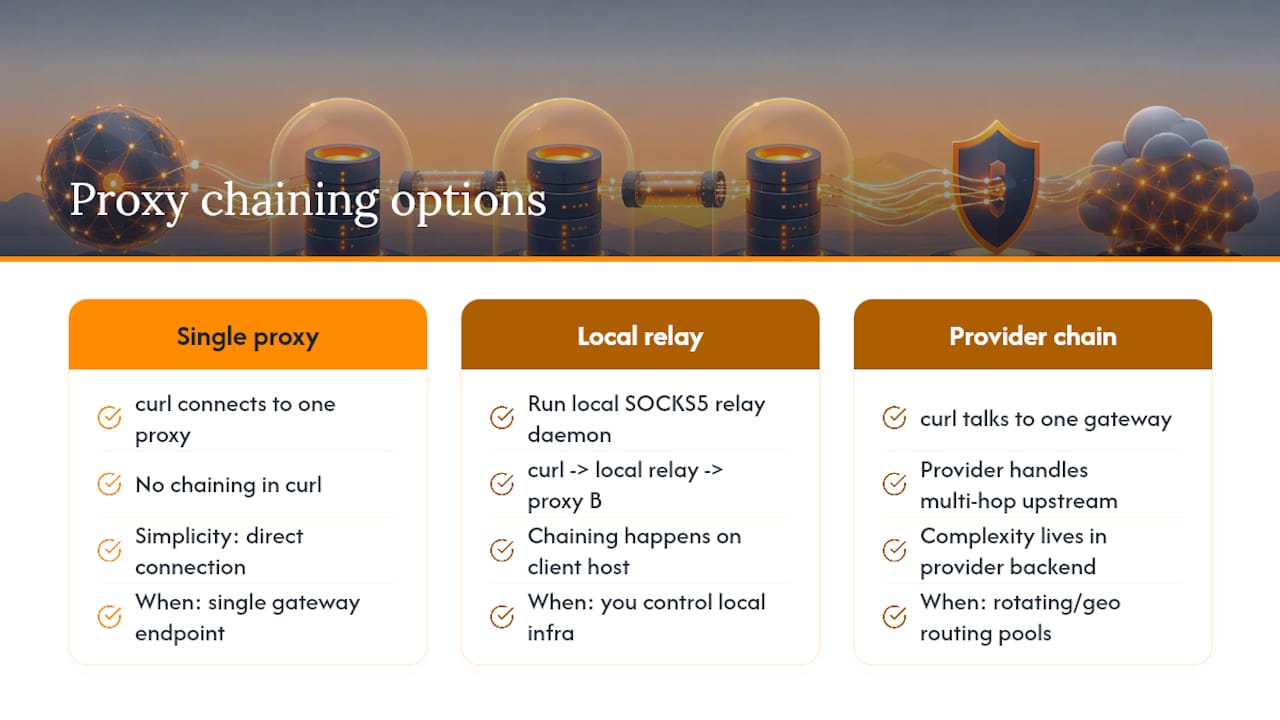
If you need a genuine proxy chain (client to proxy A, proxy A to proxy B, then out to the target), curl itself won't build that chain for you. You have two practical routes. The first is running a local SOCKS5 relay (something like a small local daemon that itself connects outbound through a second proxy) and pointing curl's --proxy at that local relay's address or unix socket. The second is handling any multi-hop routing at the network or proxy-provider level, where the proxy service itself manages the chain internally and hands curl a single, already-chained entry point.

This second approach is why most developers dealing with rotating proxy pools never think about "chaining" as a curl concept at all. The rotation, geographic routing, and IP diversity happen upstream on the provider's infrastructure, and curl just talks to one gateway address like it would with any single SOCKS5 proxy. From curl's perspective, a rotating pool of 50,000 IPs behind a single gateway endpoint looks identical to one proxy. The complexity lives in the provider's backend, not in your curl command.
The practical takeaway: don't try to force curl into a multi-proxy topology with flags it doesn't have. If your use case genuinely needs multiple hops, build that at the infrastructure layer and keep your curl command pointed at a single, well-defined entry point.
Author's Quick Take on Curl and SOCKS5
My default is always socks5h:// with --proxy, and -v the moment anything looks wrong. Self-hosting a single SOCKS5 proxy is fine for testing; once you need rotation or scale, a managed service saves far more debugging time than it costs.
— Daniel
Reliable SOCKS5 proxy use with curl comes down to one habit: default to socks5h:// so the proxy resolves DNS, not your client.
| Point | Details |
|---|---|
| Use socks5h:// by default | It prevents DNS leaks and resolves hostnames on the proxy side instead of locally. |
| Prefer --proxy with a scheme | The scheme-prefixed syntax works consistently across HTTPS, FTP, and other protocols. |
| Separate credentials from the URL | Use --proxy-user instead of embedding passwords where shell history or logs can expose them. |
| Debug with -v before changing config | Verbose output and a quick nc -zv check catch most connection failures before you touch curl flags. |
| Scale with a managed rotating provider | Rotatingproxyhub handles IP rotation and country targeting so high-concurrency curl workflows avoid self-hosted maintenance. |
Get a Rotating SOCKS5 Proxy Built for High-Volume curl Requests
Running your own SOCKS5 gateway works fine until you need dozens of concurrent connections without getting rate-limited. That's the exact gap Rotatingproxyhub closes: automatic IP rotation across a large pool of datacenter proxies, country targeting, and SOCKS5 or HTTP/S access with either username and password or IP-based authentication, so your curl scripts keep running without babysitting a single proxy's uptime.
The setup mirrors everything covered above: point --proxy at your assigned gateway with a socks5h:// scheme, add --proxy-user, and you're issuing rotated requests instead of hammering a single IP that may get rate-limited or blocked. It fits scraping, monitoring, and market research workflows where concurrency and IP diversity matter more than manually managing your own proxy infrastructure. If you want to test it against your own curl commands first, start with a free rotating proxy trial and confirm the gateway responds the same way any SOCKS5 proxy would before moving to a paid plan.